
Quotes your customers accept and pay from a link
Send the quote while you’re still on the drive. Your customer accepts it on their phone and pays the deposit by card, with the cancellation information already on the page.
Coming soon to the App Store and Google Play.
How does a customer accept a quote online?
They tap your link, read the quote and accept it at the bottom. No app, no login: the page shows your logo and the quote exactly as printed, VAT and all, with the right to cancel and any job photos you added. Download PDF gives them a copy.
Above the button, the customer ticks any notice that needs initials, agrees to receive the paperwork electronically, adds a name and an email address, and draws a signature or signs with the typed name. Where the quote carries a right to cancel, the button reads Order with obligation to pay, under a summary of what they’re ordering. A signed copy goes to both of you.
Should I send a link, a PDF or an email?
Any of the three, once you’ve tapped Send. Sending needs a signal, because our server gives the quote its number, and Quotebird keeps a copy of exactly what you sent that can’t be altered. Share link puts the customer’s page into WhatsApp or a text, Share PDF sends the file, and Email to … gets Quotebird to send it.
Emailed quotes go out under your business name with “via Quotebird” added and the PDF attached. When the customer replies, it lands in your business email, not the address you log in with.
Kitchen downlights, quoted and sent
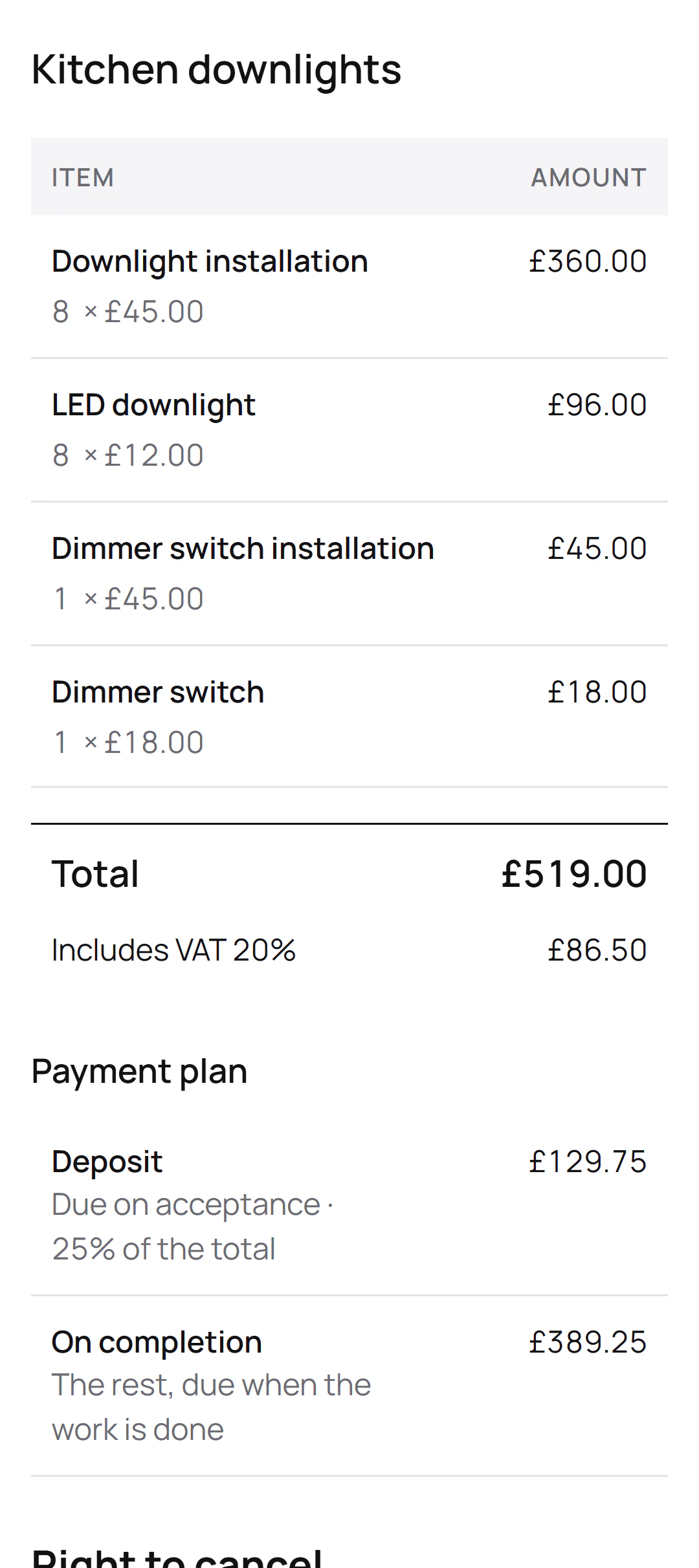
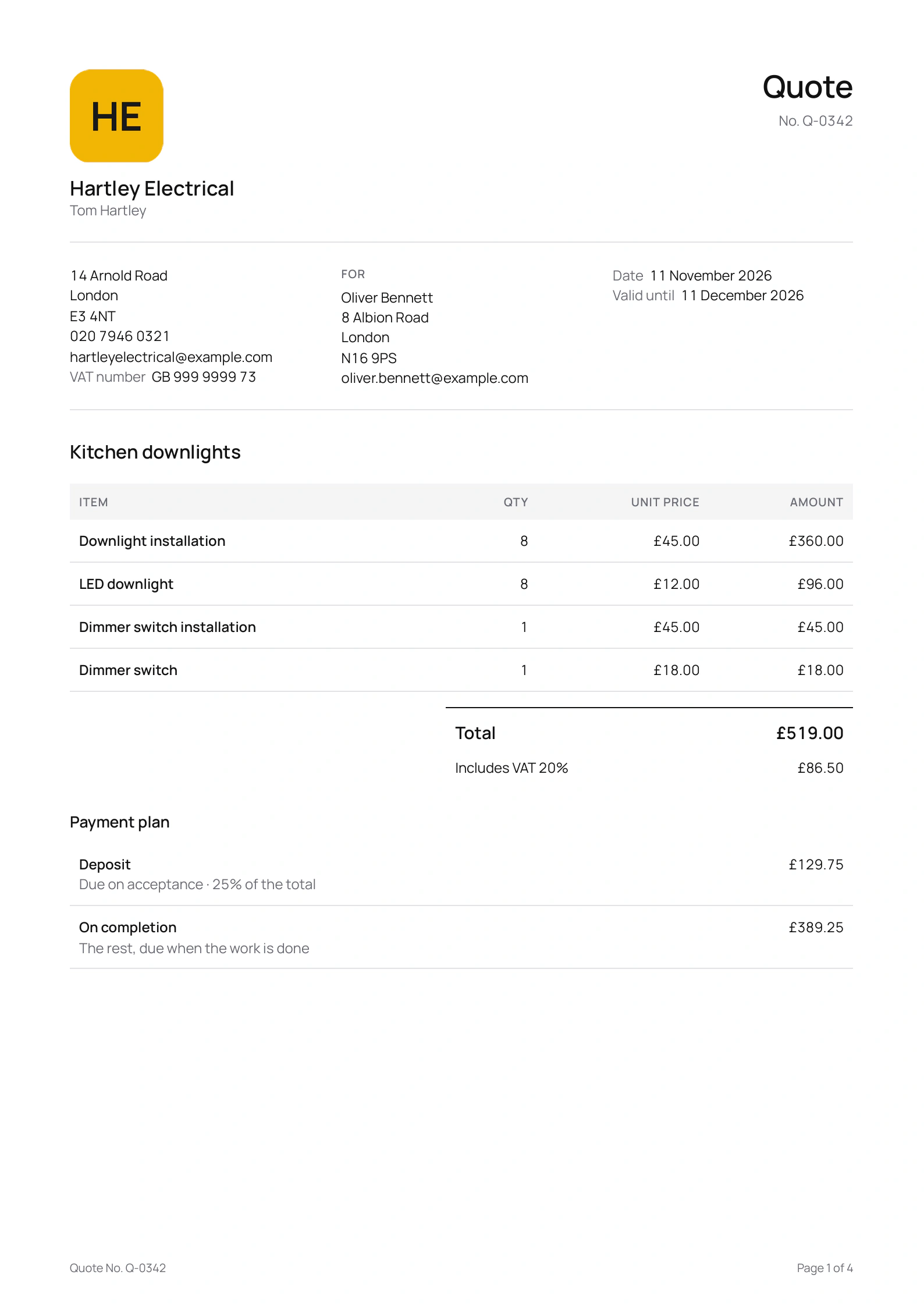
Tom Hartley is the London electrician in this site’s screenshots, a demo business we made. After a visit to Oliver Bennett’s home he sent quote Q-0342, asking a 25% deposit:
What the quote lists
- Downlight installation
- LED downlight
- Dimmer switch installation
- Dimmer switch
What Oliver’s page shows
- Eight downlights at £45.00 each to fit and £12.00 each to buy.
- A total of £519.00, including £86.50 VAT at 20%.
- A deposit of £129.75 on acceptance, and £389.25 when the work is done.
- His right to cancel and the cancellation form, under the payment plan.
Tom quoted after a visit to Oliver’s home, so the page carries the 14-day right to cancel, its button reads Order with obligation to pay, and Oliver can tick a box to ask Tom to start sooner.
How does the 14-day right to cancel work on the page?
A quote to a consumer carries the model cancellation information and form: after a home visit once it’s over £42, and at any price when you quoted without one. Before accepting, the customer can tick a box asking you to start within the 14 days. Your copy then shows The customer asked you to start now, or else the first day you can start.
Until the period ends, the customer can use Cancel contract here on the same page. You’re both emailed straight away and the quote shows Cancelled, then Refund the customer with the date, 14 days on. A card payment taken through Quotebird goes back in one tap.
Can they sign on my phone while I’m there?
Yes. Choose Customer signs on this phone when you send, or Customer signs here on a quote already sent. The page stays open for 30 minutes, for that version only. Doing the job there and then? Start work on the Invoices tab lets the customer read the cancellation information, ask you to start now and sign before you begin, and a copy goes to them by email.
Will I know they’ve read it?
The sent quote’s Customer page row says Not opened yet, then Viewed with the date; WhatsApp’s link preview and your own look don’t count. The Quotes tab badge follows, then turns to Accepted, and you get an email with the signed copy.
To change a quote you’ve sent, tap Revise. It keeps its number and its link, and the customer can’t accept until you send the revision.
Does it chase unpaid invoices?
Yes, for invoices you sent with Email to …. A reminder goes 3 days before the due date if you allowed 7 days or more to pay, and again 1, 7, 14 and 30 days after it, each one once, between 9 am and 6 pm. It attaches the invoice and says what’s left to pay. Paid, voided or credited invoices stop getting them, and you can turn them off for one invoice or for all in Settings.
Questions
Does the deposit wait for the 14 days?
No, it can be paid as soon as the customer accepts. If they then cancel, you refund it from the quote.
What if the work changes after they accept?
An accepted quote stays as the customer signed it. Extra work goes on its own numbered change order, which the customer signs from a link before you start.
Will my phone tell me when a customer pays?
Yes, once you turn on Notify me when a customer pays under Get paid online in Settings. It shows Payment received with the amount, never who paid.
Step by step, with every button
Questions? Write to us at support@quotebird.app.