
Quotes customers sign and pay from a link
Send the quote from the ute as a link or an email. The customer signs it on their phone and pays the deposit by card, and when they sign on your phone at the job, Quotebird holds payment through the cooling-off period.
Coming soon to the App Store and Google Play.
How does the customer sign the quote?
On the page your link opens: your logo up top, then the quote exactly as it prints, GST included, plus any notice the Australian Consumer Law asks for and the job photos you added. No app and no login, and Download PDF keeps a copy.
The customer ticks any notice asking for a signature or initials, agrees to get the paperwork electronically, puts in a name and an email address, and draws a signature or lets the typed name do. Accept and sign emails the signed copy to both of you.
How do I get the quote to them?
Send it first: our server numbers the quote, so you need reception, and Quotebird keeps a copy of exactly what went that can’t be changed. Then Share link to text it, Share PDF for the file, or Email to … for Quotebird to email it.
Emailed quotes carry your business name plus “via Quotebird”, with the PDF attached, and replies go to the email on your business profile. Up to 100 emails go out a day.
A hedge and a garden bed, signed on site
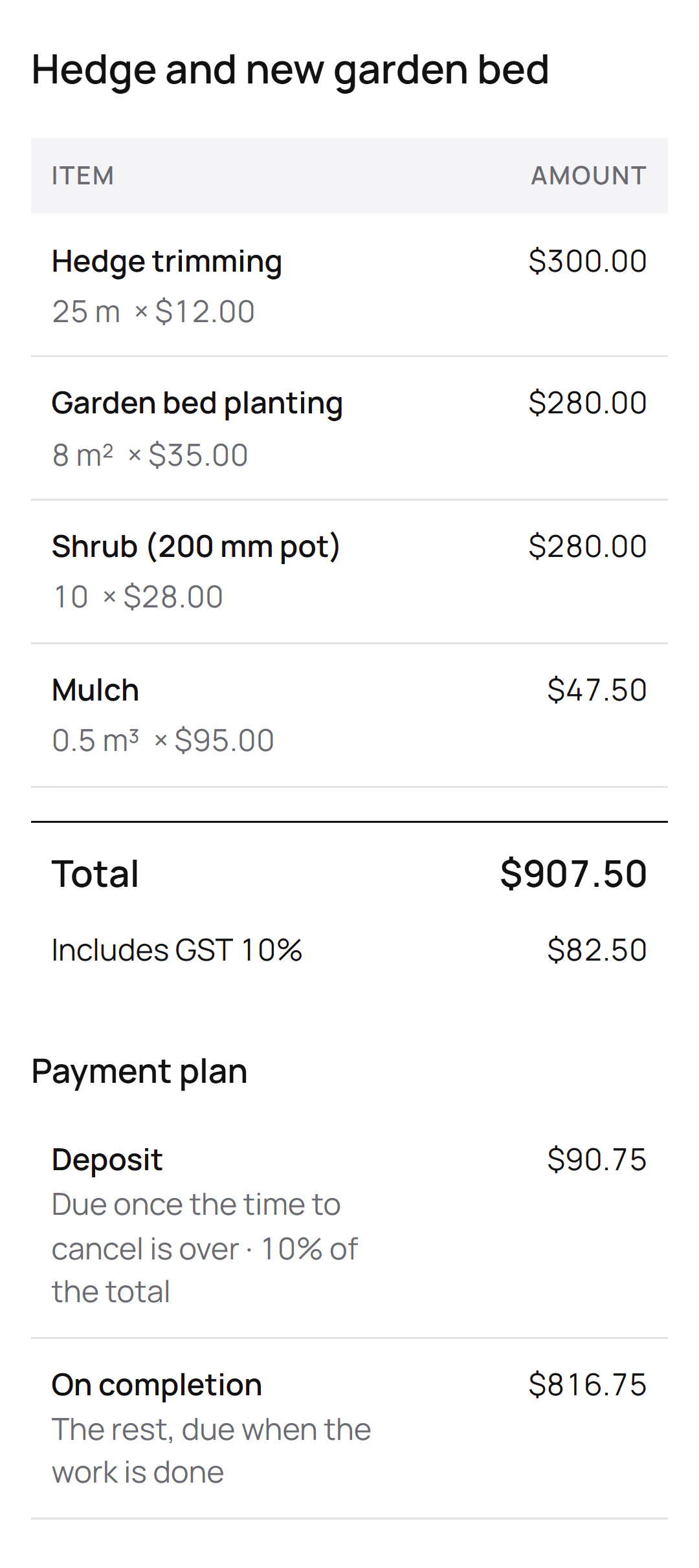
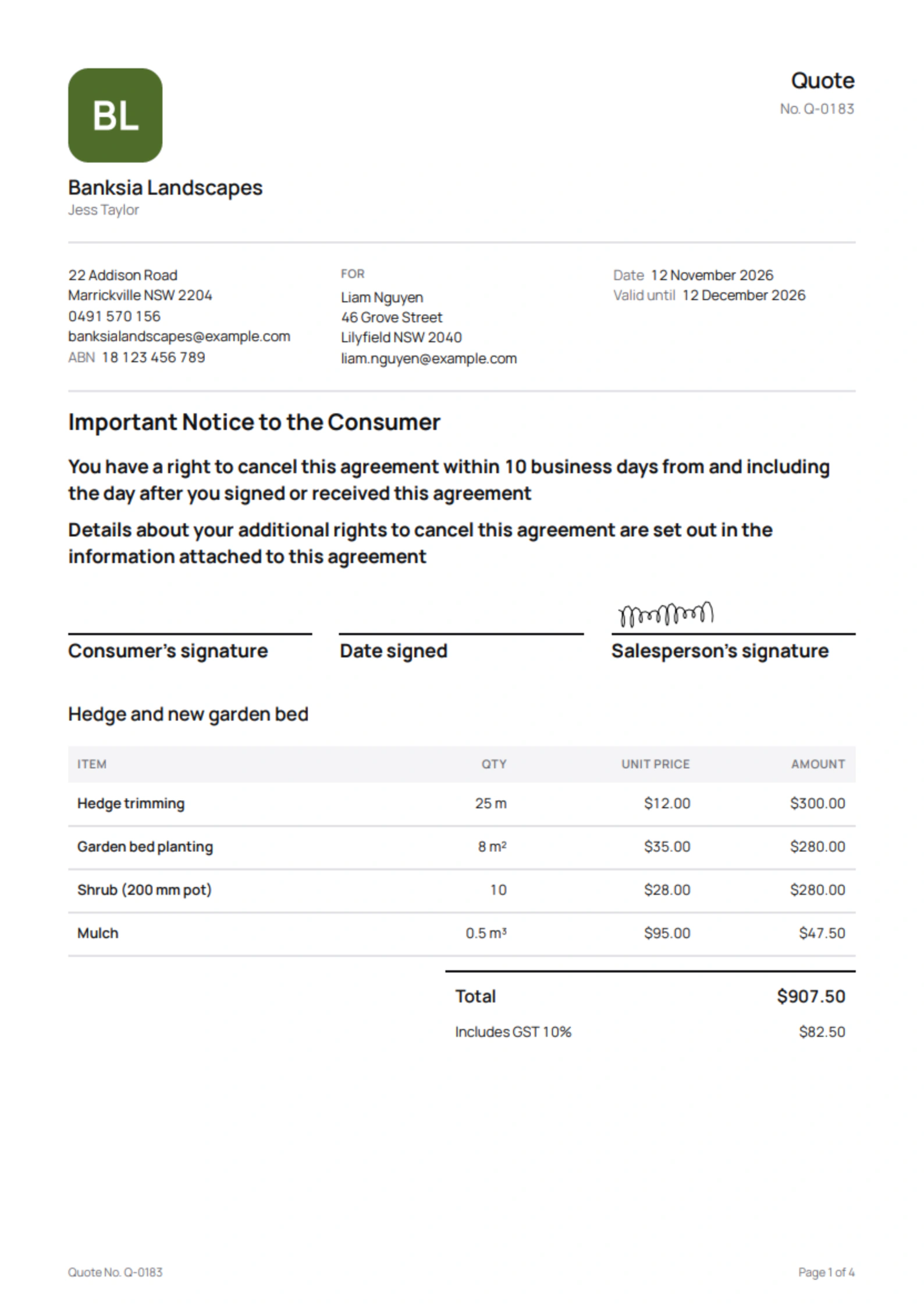
Jess Taylor runs the New South Wales landscaping business in this site’s screenshots, a demo we set up for them. She quoted Liam Nguyen in Lilyfield, Q-0183, made for him to sign on her phone, with a 10% deposit:
What the quote lists
- Hedge trimming
- Garden bed planting
- Shrub (200 mm pot)
- Mulch
What Liam’s page shows
- The Important Notice to the Consumer on the front page: 10 business days to cancel.
- A total of $907.50, GST of $82.50 included.
- A deposit of $90.75, due once the time to cancel is over.
- The other $816.75 when the work is done.
Once Liam signs on Jess’s phone, her copy shows the day she can start and take the deposit. On that day his page opens the payment and emails him the link, so Jess doesn’t have to chase it.
What changes when the customer signs on my phone?
Choose Customer signs on this phone and the page opens on your phone for 30 minutes, for that version only. Over $100, a quote signed that way, or one where you started the conversation, is an unsolicited consumer agreement: it carries the Important Notice to the Consumer on its front page and the termination information, and payment waits 10 business days, not counting weekends or public holidays.
Your copy shows Cooling-off period and the day you can start and take payment, deposit included. On that day the payment opens on the customer’s page by itself and they get an email with the link. When the customer called you and accepts from the link later, none of this applies.
Will I know when they’ve opened it?
Yes. The sent quote’s Customer page row reads Not opened yet, then Viewed with the date, and the Quotes tab badge does the same before it turns to Accepted. You also get an email when they sign. A link preview in a text and your own look at the page aren’t counted.
Can I change a quote after it’s sent?
Tap Revise. It turns back into a draft under the same number, and the customer’s link stays put. Until you tap Send revision, their page says you’re updating the quote and can’t be signed. Once accepted, a quote stays as signed, and extra work goes on a change order.
Does it chase invoices that haven’t been paid?
It does, for invoices you sent with Email to …. One reminder goes 3 days before the due date when you gave 7 days or more, then more go 1, 7, 14 and 30 days after it, each once, between 9 am and 6 pm your time. They attach the tax invoice and show what’s left owing, and stop when it’s paid, voided or credited. Turn them off for one invoice or for the lot in Settings.
Questions
Do customers need to download anything?
No. The link opens in any browser. The page pulls in nothing from other sites, stays out of search results, and tells the customer your business looks after their details, with Quotebird storing them for you.
Can they pay by card from the link?
Yes, once you take card payments through Stripe. Accepting a quote with a deposit issues the deposit invoice on the same page with a Pay button, and the money goes straight to your Stripe account. On site, Tap to Pay takes cards on your phone.
Will my phone tell me when someone pays?
Turn on Notify me when a customer pays under Get paid online in Settings, and it shows Payment received with the amount, never the customer’s name.
Step by step, with every button
Questions? Write to us at support@quotebird.app.