
Estimates your customers sign and pay from a link
Send the estimate before you leave the driveway. Your customer signs it on their phone and pays the deposit by card, and Quotebird tells you when they opened it and when they signed.
Coming soon to the App Store and Google Play.
How does a customer sign an estimate online?
They open your link and sign at the bottom. No app to install, no account to make. The page carries your logo and shows the estimate as printed, with any notice the law asks for and the job photos you included; Download PDF saves a copy.
The customer ticks each notice that asks for initials, opens a short test PDF and agrees to get the paperwork electronically, types a name and an email, then draws a signature or lets the typed name stand. Accept and sign finishes it, and both of you get the signed copy by email.
How do I send an estimate to a client?
Tap Send. Our server numbers the estimate, so this step needs a signal, and Quotebird keeps an unchangeable copy of what went out. Then Share link drops the page into a text or any messaging app, Share PDF sends the file, and Email to … has Quotebird mail it.
The email shows your business’s name followed by “via Quotebird” and carries the PDF; replies go to the email on your business profile, never your sign-in address. Up to 100 go out a day.
A bathroom job, as James Carter sees it
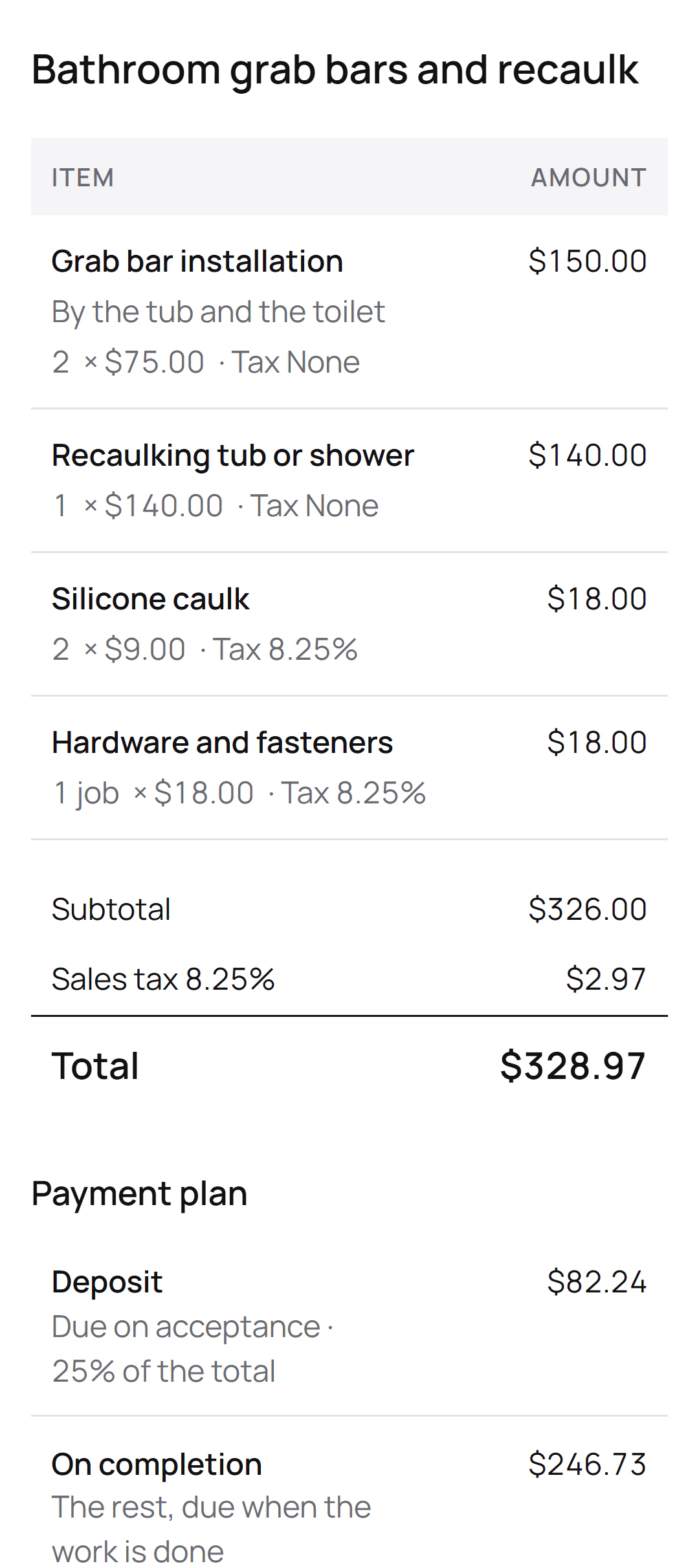
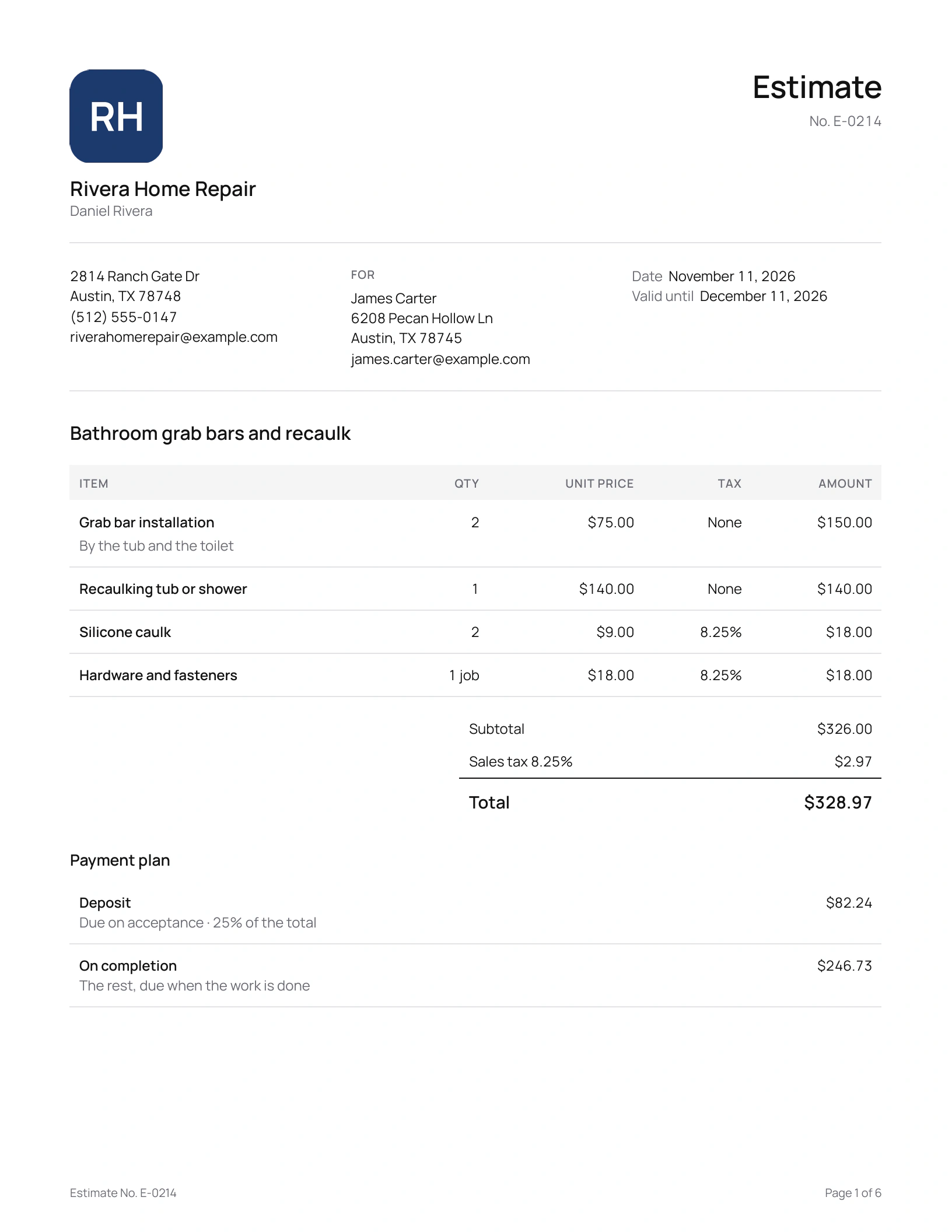
Daniel Rivera is the Texas handyman in this site’s screenshots, a demo business we set up. He sent estimate E-0214 to James Carter for grab bars and a recaulk, with a 25% deposit:
What the estimate lists
- Grab bar installationBy the tub and the toilet
- Recaulking tub or shower
- Silicone caulk
- Hardware and fasteners
What James’s page shows
- Sales tax of 8.25% on the caulk and the hardware only: $2.97.
- A total of $328.97.
- A deposit of $82.24, due when he accepts.
- The rest, $246.73, on completion.
Once James signs, Daniel’s phone shows Accepted. With card payments set up through Stripe, a deposit invoice for $82.24 appears under the signature with a Pay button, and the money goes to Daniel’s own Stripe account.
Can I see when they open it?
Yes. On the sent estimate, the Customer page row reads Not opened yet, then Viewed with the date; a link preview in a text thread doesn’t count, and neither does your own look. The Quotes tab badge moves to Viewed, then Accepted, and an email brings you the signed copy.
What if the customer asks for a change after I send it?
Tap Revise. The estimate becomes a draft again under the same number, and the customer’s link doesn’t change. While you edit, their page says you’re updating it and won’t take a signature; Send revision puts the new version on the same page. Once it’s signed, extra work goes on a change order instead.
Can a homeowner sign on my phone at the walkthrough?
Yes. Pick Customer signs on this phone when you send, or Customer signs here on one you’ve sent. The page opens on your phone for 30 minutes, for that version only. A deal signed this way counts as made at the customer’s home, so the in-person rules apply, like a right to cancel and its form; if the version you sent wasn’t made for that, Send and open sends one that is.
Starting the job right away? Start work, under New on the Invoices tab, has the customer sign an estimate before you pick up a tool.
How do payment reminders work?
An invoice you sent with Email to … gets reminders from your business’s name: 3 days before the due date when you gave 7 days or more to pay, then 1, 7, 14 and 30 days after it. Each goes once, between 9 am and 6 pm your time, with the invoice attached and what’s still owed.
They stop when the invoice is paid, voided or credited, or after a refund. Turn them off for one invoice under Payment reminders, or for all in Settings. An invoice shared only as a link or a PDF gets none, because Quotebird doesn’t know the customer received it.
Questions
Does my customer need an app or an account?
No. The link opens in any browser. The page loads nothing from other sites and asks search engines not to list it.
Can I take the deposit right away everywhere?
Not everywhere. Where the law holds payment, the page tells the customer when they can pay: after New York City’s 3 business days, or once the work is done on a California service and repair contract. A dated hold lifts by itself, and the customer gets an email with the link.
What does Quotebird keep when a customer signs?
The signed copy, the name and any drawn signature, the time, the IP address and the device, kept with the copy you sent. For a home contract in California, the app warns you once that an online signature relies on the federal ESIGN law.
Step by step, with every button
Questions? Write to us at support@quotebird.app.