
A price book for contractors, with sales tax by state
Set your prices once and every estimate uses them. Start from your trade’s items, each one taxable or not by your state’s rules for labor and materials, and let the AI pick from the book. It never names a price.
Coming soon to the App Store and Google Play.
What goes in a contractor price book?
Everything you charge for: labor, materials and other charges like a dump fee or a travel charge. Estimates and invoices take their prices from it.
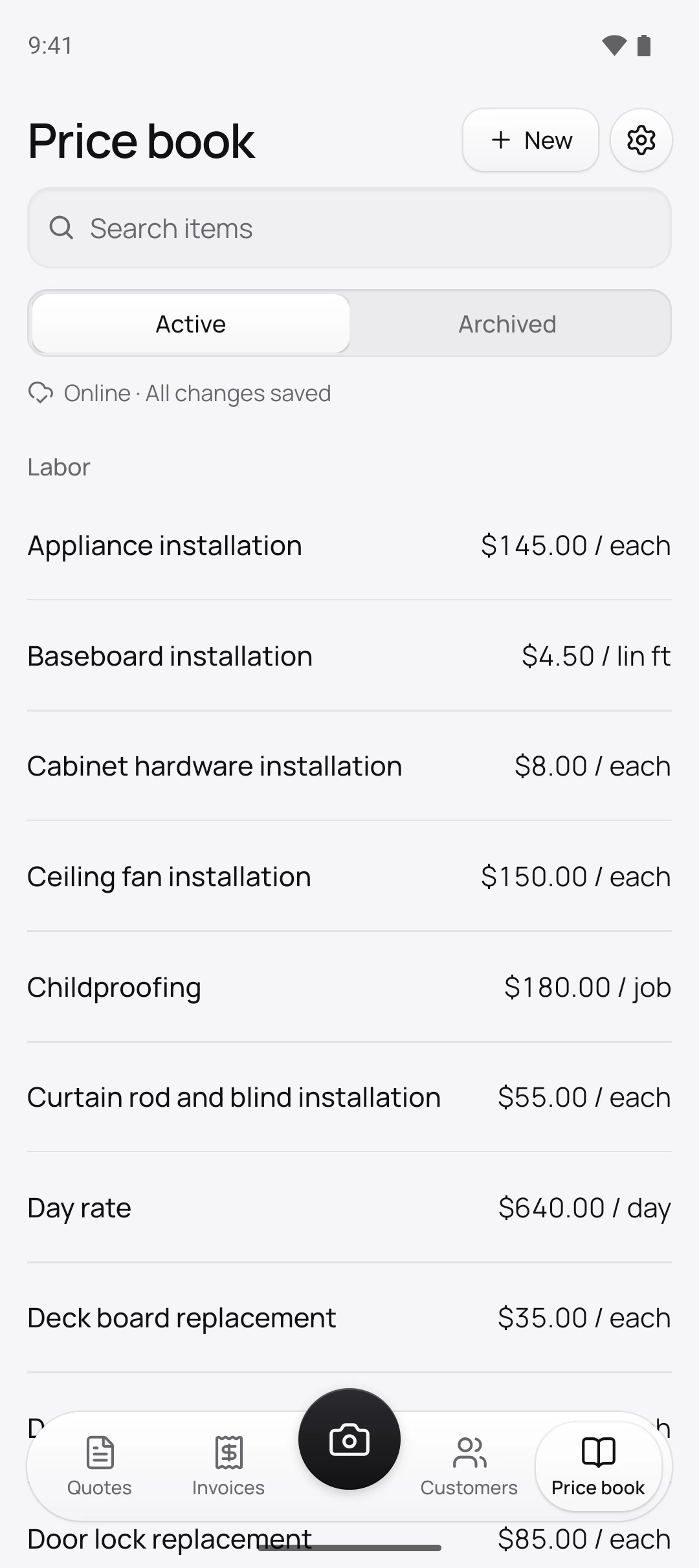
On the Price book tab, tap New. Choose the Type (Labor, Material or Other) and the Unit: job, hour, linear foot, square foot, cubic yard, gallon, or a roofing square of 100 sq ft. The Price per unit can wait; an item without one shows No price until you fill it in.
How do I price jobs without typing a price list from scratch?
Start from your trade’s starter book, offered while your price book is empty. Tap Choose your trade and Quotebird adds 30 to 80 common items for handyman, plumbing, electrical, painting, HVAC, roofing, landscaping, cleaning, pressure washing or auto repair work. Enter Your hourly rate and the hourly labor items take it; every other price starts empty, so you set your own as the jobs come in.
A Texas handyman’s book on one estimate
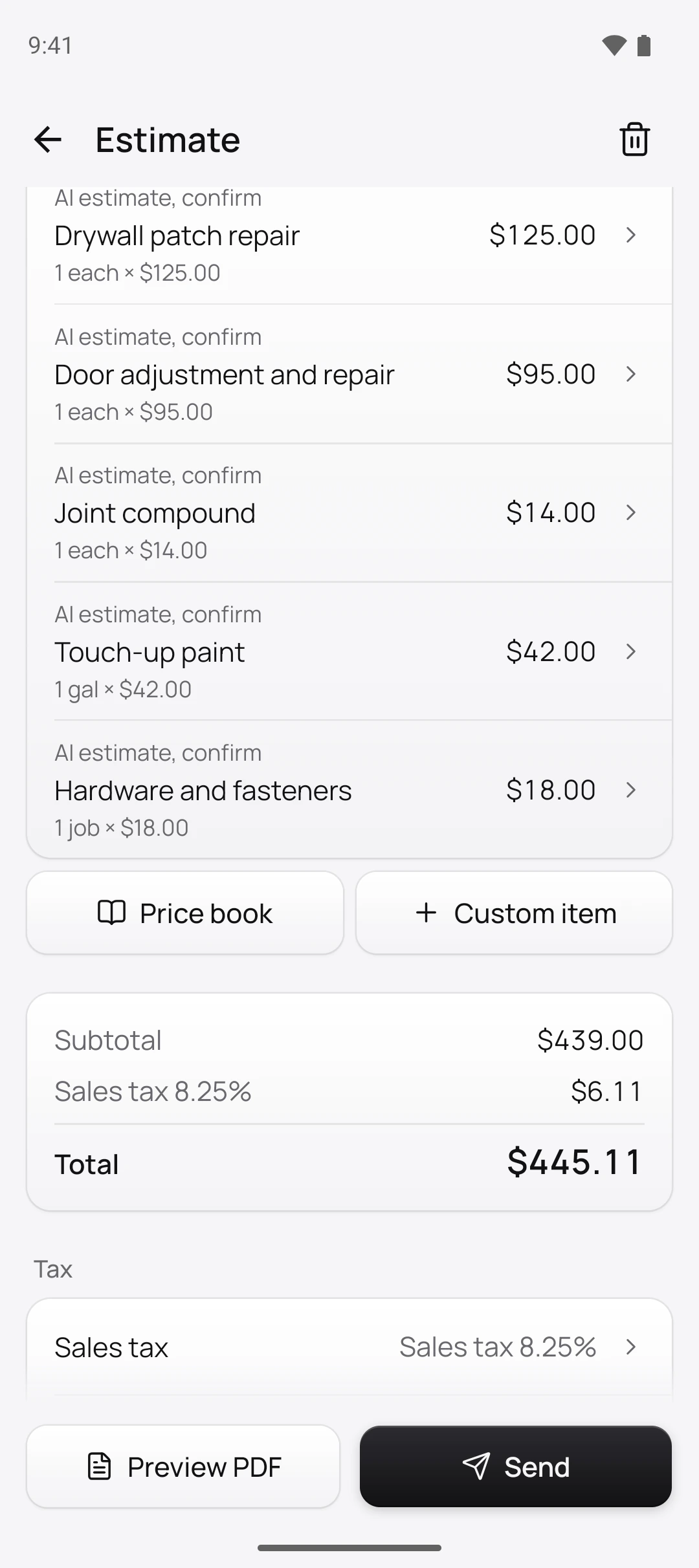
Daniel Rivera is the Austin handyman in this site’s screenshots, a demo business we set up for them. He added the 51-item handyman book with his $85 hourly rate, then priced the items he uses. For a disposal, a drywall patch and a closet door, the AI picked six of them:
Labor, which starts not taxable in Texas
- Appliance installation$145.00 each, for the garbage disposal
- Drywall patch repair$125.00 each
- Door adjustment and repair$95.00 each
Materials, which start taxable
- Joint compound$14.00 each
- Touch-up paint$42.00 a gallon
- Hardware and fasteners$18.00 a job
Each line took Daniel’s price, $439.00 in all. The 8.25% sales tax he entered went on the $74.00 of materials only: $6.11, for $445.11. His dump fee, junk removal and travel charge items still read Taxable to be safe until he checks them.
How does each item know whether to charge sales tax?
From your state, your trade and the item’s type. Starter items come in taxable or not by those three, from official state sources. Where we couldn’t confirm a rule, the item stays taxable and its Taxable switch reads Taxable to be safe, so you check it and set it yourself.
In Alaska, Delaware, Montana, New Hampshire and Oregon nothing starts taxable, and Alaska’s items remind you that a city or borough may tax them. In Hawaii and New Mexico everything starts taxable. In California, fixtures you furnish and install, like a furnace, an AC unit or a recessed light, start taxable while other materials don’t. Any item can be changed.
Does the AI ever set my prices?
No. When you draft an estimate from photos, the AI sees each item’s name, unit and type, never its price. It picks items and estimates quantities, and Quotebird multiplies by your price. Work your book doesn’t cover comes in as No price, adds nothing to the total and waits for you.
Price that line and tap Save, and Quotebird offers to keep it: Save to price book prices it for you next time, Only this estimate leaves your book alone.
What happens when I raise a price?
New estimates use it; the ones you’ve sent don’t change. Edit the item, and drafts you add it to take the new price too, while sent estimates and invoices keep theirs.
An item you stop offering is archived, never deleted, because sent paperwork may name it. Archive hides it from the list, from new estimates and from AI drafts, the Archived tab keeps it, and Restore brings it back.
Can I import my price list from Joist or a spreadsheet?
Yes. Export a CSV from Joist on a computer (Items, then the ⋮ menu, then Export) or save your spreadsheet as CSV. Then go to Settings → Import customers and items, choose Price book and tap Choose CSV file. Quotebird matches the columns by their names; a Kind column takes Labor or Material, and Taxable takes yes or no.
One file takes up to 5,000 rows, and items you already have, by name and unit, are skipped.
Questions
What does “Taxable to be safe” mean?
No official source we found settles that item in your state, so it starts taxable until you decide. Open it, check your state’s rule and set the switch.
What about repairs versus capital improvements?
In New York, New Jersey, North Carolina, West Virginia and Iowa, an estimate for building work asks under Type of work whether the job is a repair or a capital improvement, and the lines’ tax follows the answer. North Carolina painting isn’t asked.
Can I take my price book with me?
Yes. Settings → Export your data prepares a zip with every PDF you sent and a price-book.csv, archived items included, that opens in Excel, Numbers and Google Sheets.
Step by step, with every button
Questions? Write to us at support@quotebird.app.