
Change orders your customer signs before the work changes
When the homeowner wants more done, or less, after signing the estimate, Quotebird writes it up as a numbered change order from your price book. They sign it before you start, and the contract price, the payments and the final invoice follow.
Coming soon to the App Store and Google Play.
What is a change order in Quotebird?
A separate document for work added to an estimate the customer has accepted, or taken off it. Our server gives it a number from its own series, CO-0001 onward, when you send it, and it states four things: the work, the amount added or taken off, what that does to the payments, and the completion date.
The estimate itself stays exactly as the customer accepted it, and each change order sits under it in the app with its own status.
How do I write a change order?
Open the accepted estimate and tap New change order under Change orders. Add items from your price book as you would on an estimate, and on each one choose Adds work or Takes work off. If the change pushes back the finish, set New completion date; left empty, the estimate’s date stands.
The customer, the job address, the sales tax and the payment plan come from the estimate. Tap Sign and send: Quotebird signs it for your business with the signature saved in Settings, dated that day, and the customer signs next.
A third grab bar, signed on the spot
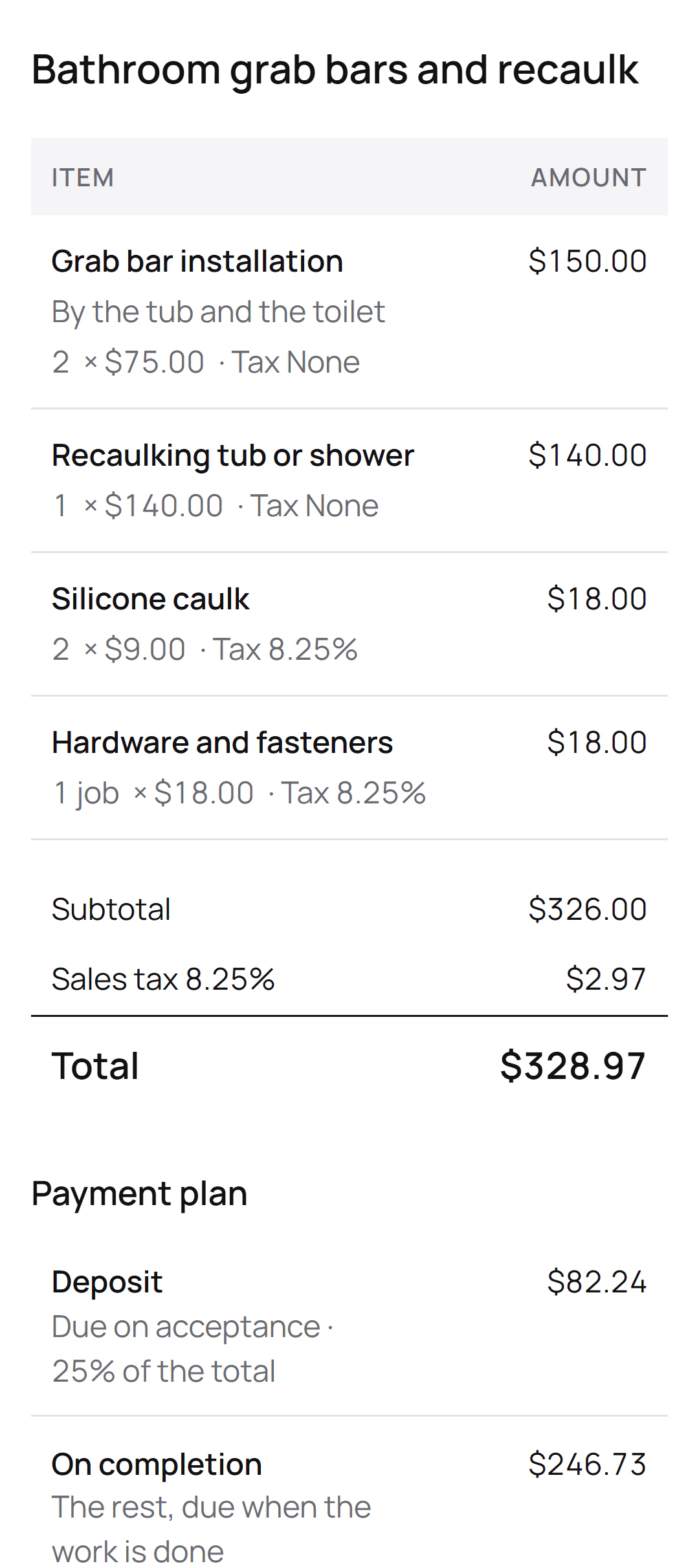
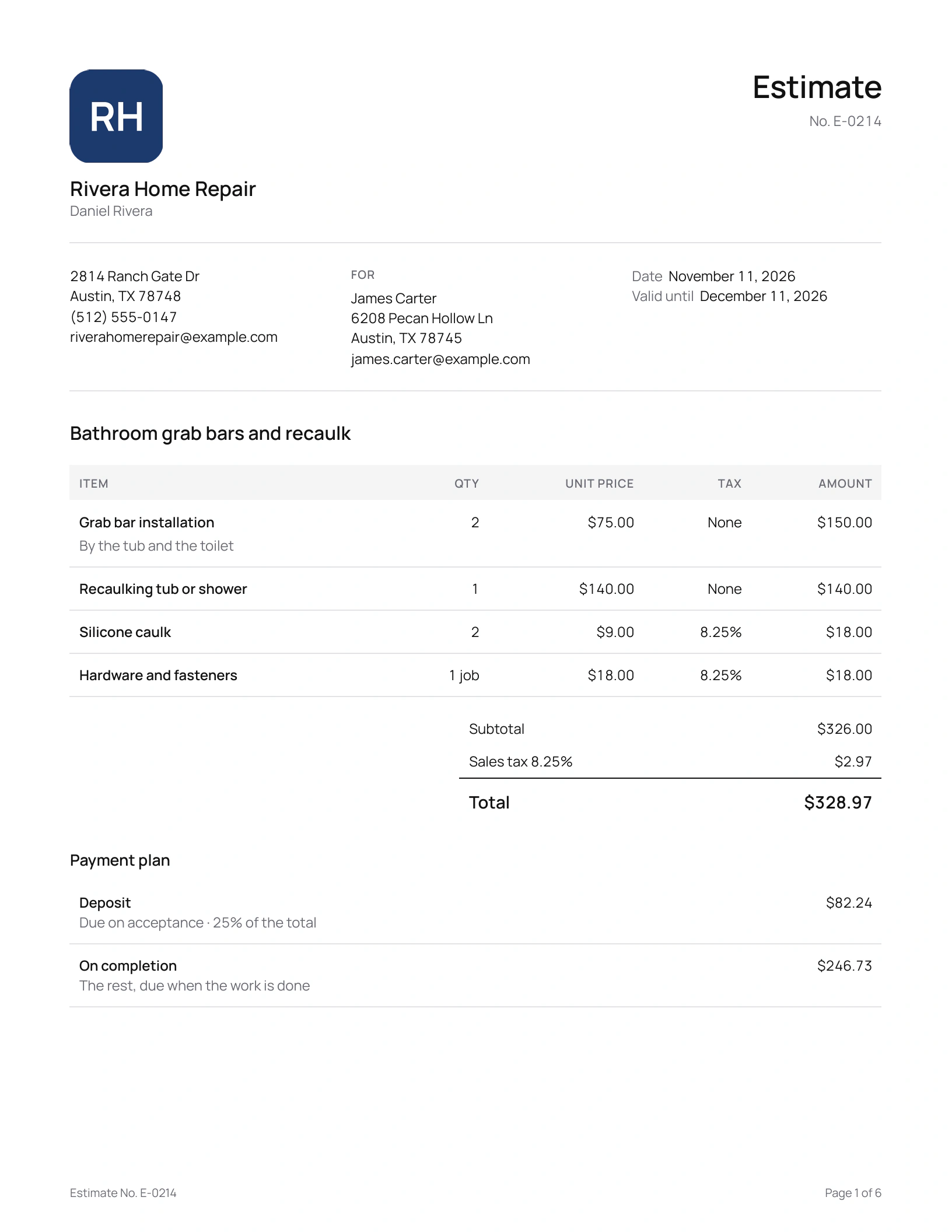
Daniel Rivera is the Texas handyman behind this site’s screenshots, a demo business we set up for them. His sent estimate for James Carter covers two grab bars, by the tub and the toilet, and a recaulk, with a 25% deposit. Say James asks for one more on the day:
“Can you put a third bar in the shower while you’re here?”
The change order
- Grab bar installationA third bar, in the shower
- Hardware and fasteners
What it says
- $93 added before sales tax, at Daniel’s own prices: $75 for the bar and $18 for the fasteners.
- The amount goes onto the payment due on completion; the deposit stays as agreed.
- The completion date doesn’t change.
James signs on Daniel’s phone before the bar goes up. When the job’s done, the final invoice lists the estimate’s four lines, then the shower bar and its fasteners marked “From CO-0001”, and takes off the deposit Daniel already invoiced.
How does the customer sign it?
From a link, like the estimate, or on your phone if they’re standing next to you: choose Customer signs on this phone as you send it. They enter their name and email, draw a signature or let the typed name stand, and tap Accept and sign. You both get the signed copy by email, and Quotebird keeps an unchangeable copy of every version it sent.
What happens to the payment schedule?
The deposit and any progress payments stay as agreed. The change is added to the payment due on completion, or taken off it, and the change order prints that payment before and after, with a table of the contract price: the estimate, any earlier change orders, this one and the new total. The estimate then shows Contract price with changes.
A change order can’t take off more than is left to pay on completion; money going back to the customer goes on a credit note.
What does Quotebird add in California?
On a California home improvement contract over $500, as opposed to the shorter service and repair contract, the estimate carries the state’s note about extra work and change orders and the homeowner’s rights on them. If you answered that subcontractors will work on the job, every change order also repeats the state’s statement about them.
When can’t I send a change order?
One change order waits for the customer’s signature at a time, so the next one goes once they sign. The final invoice also waits while a change order is unsigned, and once the final invoice is sent, the contract takes no more changes.
Questions
Do I need a change order template?
No. Every change order comes out the same way: your logo, the estimate it changes, the lines, the contract price table, the payments, the completion date and a place for both signatures. Preview PDF shows it before you send.
Can I edit a change order after sending it?
Until the customer signs it, yes: revise it and send the new version, which keeps the number. Once signed it stays as signed, and more work goes on a new change order.
Does the final invoice pick up the change orders?
Yes. It starts with the estimate’s items, then each signed change order’s, oldest first, each of those lines marked with its change order’s number. Adjust them to the work you actually did; stage invoices you already sent come off the total.
Does it work for auto repair?
Yes. On a repair estimate, a signed change order counts as the customer’s written approval of the new total when Quotebird checks the invoice against what they approved. Approvals by phone are still logged with the date, time and amount.
Step by step, with every button
Questions? Write to us at support@quotebird.app.