
Variations to an accepted quote, agreed in writing
The customer’s accepted the quote, and now they want two more downlights in the hall. Quotebird turns the variation into a numbered change order priced from your price book, VAT included as your prices are. They sign it before you start, and the price and the final invoice follow.
Coming soon to the App Store and Google Play.
How do I handle a variation in Quotebird?
As a change order: that’s Quotebird’s name for a variation, and the title your customer sees at the top. It’s a document in its own right, numbered CO-0001 onward by our server when you send it, and it covers the extra work or the work coming off, the price difference, what that does to the payments and whether the finish date moves.
The quote the customer accepted isn’t touched. It stays as they signed it, with each change order listed underneath and its status beside it.
How do I write one up?
Open the accepted quote and tap New change order under Change orders. Pick items from your price book as you would for a quote, and mark each one Adds work or Takes work off. Only set New completion date if the variation moves the finish.
VAT, the customer and the job address carry over from the quote, so a VAT-inclusive quote gets a VAT-inclusive variation. Tap Sign and send: Quotebird signs for your business with your saved signature, and the customer signs on their link or on your phone.
Two more downlights, one dimmer fewer
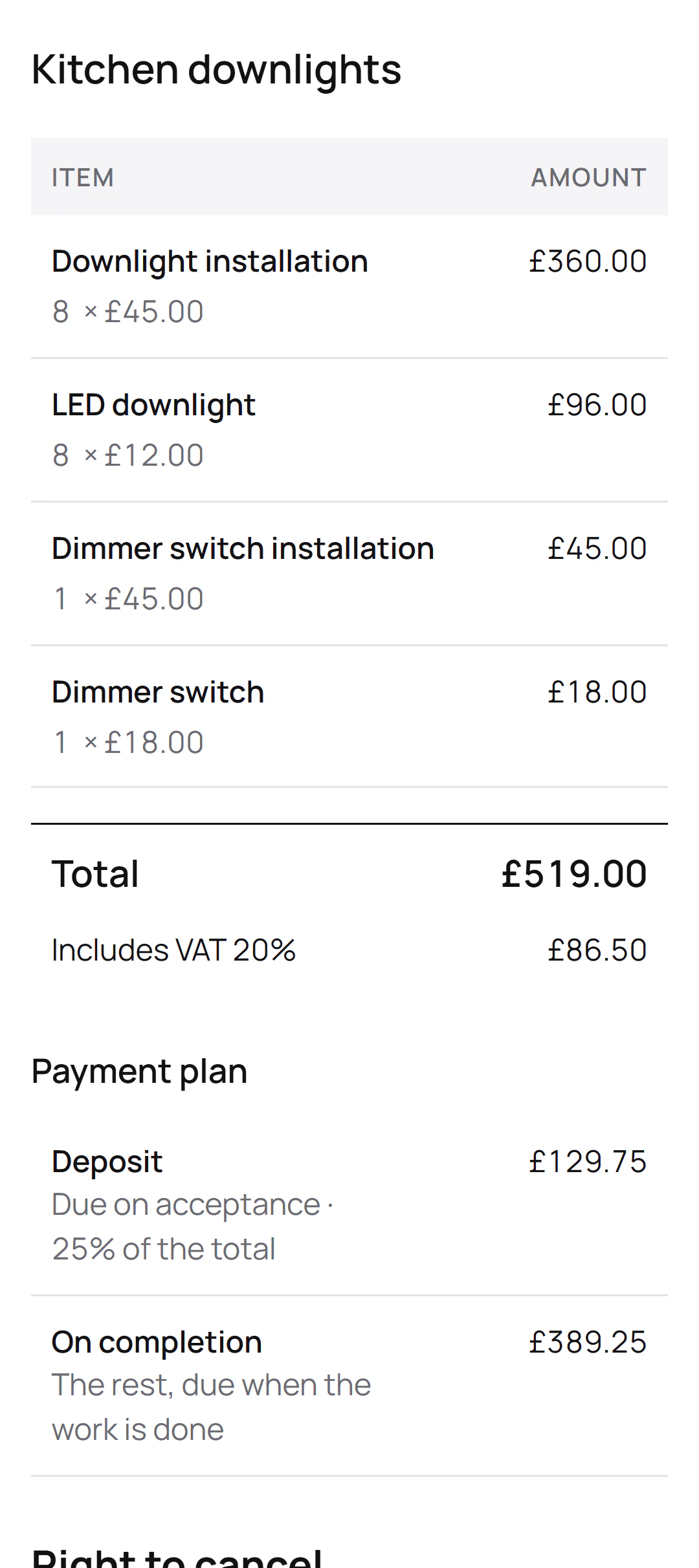
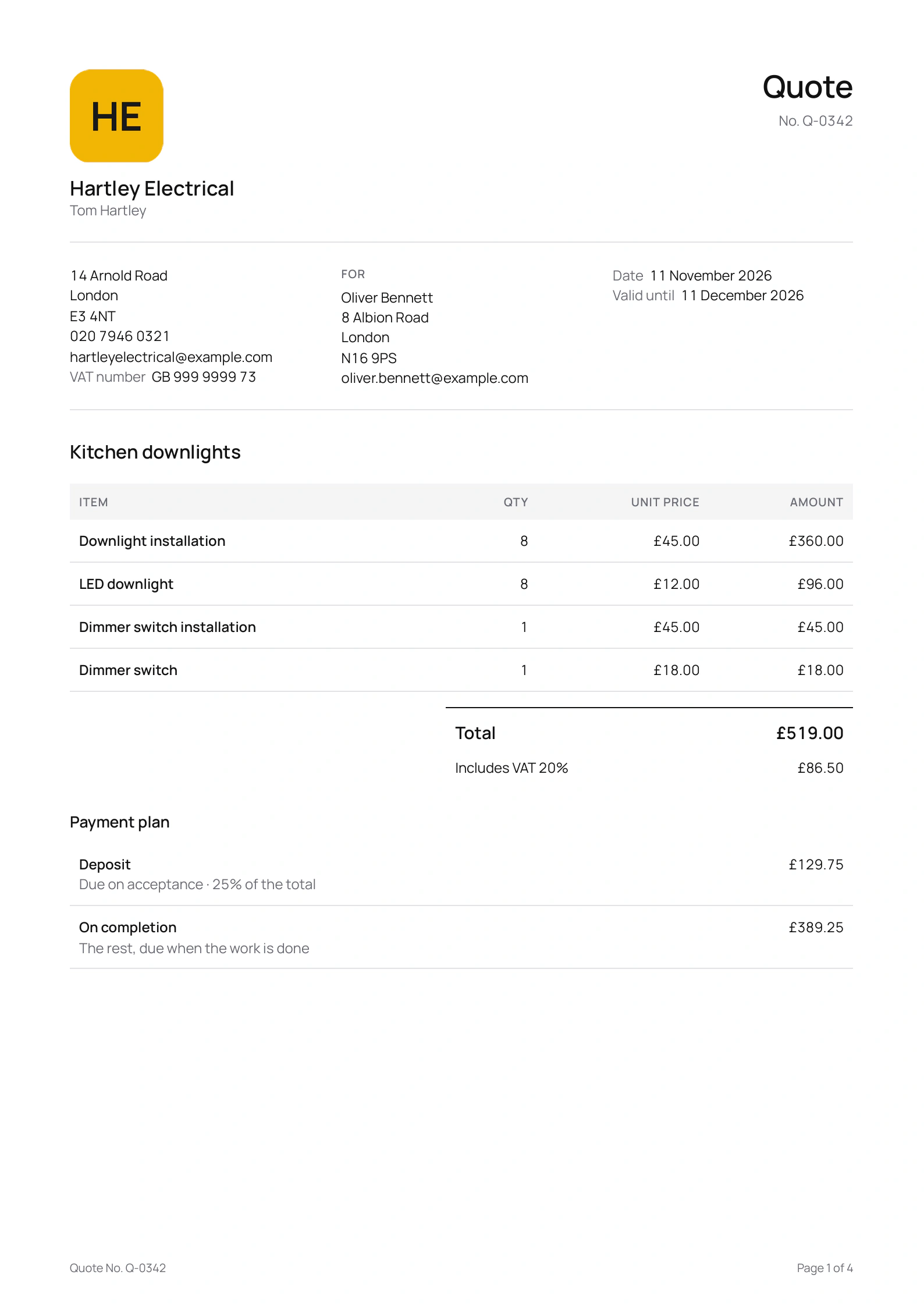
Tom Hartley is the London electrician in this site’s screenshots, a demo business we set up for them. His quote for Oliver Bennett covers eight kitchen downlights and a dimmer switch, with a 25% deposit. Say Oliver changes his mind halfway through:
“Can you put two of those in the hall as well? And leave the dimmer, we’ll keep the old switch.”
The change order
- Downlight installationTwo in the hall
- LED downlight
- Dimmer switch installationRemoved, the old switch stays
- Dimmer switchRemoved
The sums
- Adds £114 for the hall: two downlights fitted at £45 and two lamps at £12.
- Takes off £63 for the dimmer and fitting it.
- Comes to £51 more, VAT included, on the payment due on completion; the deposit stays as it was.
Oliver signs it on his own phone before Tom runs the cable to the hall. The final invoice then lists the quote’s lines, adds the two hall downlights and shows the dimmer lines as minus amounts, each marked with the change order’s number.
How does the customer agree to it?
By signing it, the same as the quote. On the link they put in their name and email, sign with a finger or let their typed name stand, and tap Accept and sign; on site, choose Customer signs on this phone and hand it over. You each get the signed copy by email, and Quotebird keeps an unchangeable copy of every version sent.
What happens to the deposit and the final payment?
The deposit and any stage payments stay as agreed. The variation’s amount goes onto the payment due on completion, up or down, and the change order prints that payment before and after, along with the contract price: the quote, each signed variation and the new total. On the quote, the app then shows the Contract price with changes.
Can a variation bring the price down?
Yes, as far as what’s left to pay on completion. Lines marked Takes work off print as “Removed” with a minus figure, but a change order can’t take off more than that remaining balance. If the customer has already paid for work that’s now off, a credit note gives the money back.
Can I do two variations at once?
One at a time: the next waits until the customer signs the last. While one is unsigned the final invoice waits too, and once the final invoice has gone the job takes no more variations.
Questions
Why does it say change order, not variation?
It’s the name Quotebird gives the document in every country. It does the job a variation does: it names the quote it changes, the work, the price difference, the effect on payments and the finish date.
Can I change a variation after sending it?
Until the customer signs, yes: revise it and it keeps its number. Once it’s signed it stays as it is, and further changes go on a new one.
Does the final invoice include variations?
Yes. It starts with the quote’s lines, then each signed change order’s, oldest first. Correct them to what you actually did, and the stage invoices you’ve sent, like the deposit, come off the total.
Can I write one with no signal?
Yes, in a loft or a cellar: it saves on your phone. Sending needs a connection, because the number comes from our server.
Step by step, with every button
Questions? Write to us at support@quotebird.app.