
Deposits and stage payments on your quotes
Ask for a deposit when the customer accepts, split a rewire or a refit into stage payments, and the quote prints what’s due when. Each stage becomes its own invoice when you get there, and the final invoice takes off what’s already been billed.
Coming soon to the App Store and Google Play.
How do I ask for a deposit on a quote?
Set it once under Settings → Default deposit: 10%, 20%, 25%, 30%, 50% or none. New quotes start with it in their Payment plan, and you can change it on any quote to another percentage or a fixed amount in pounds.
The deposit is worked out on the quote’s total, VAT included if you’re registered. It prints as Deposit, due on acceptance, with its amount, and the rest shows as On completion.
Can I take stage payments on a bigger job?
Yes, as many as the job needs. Tap Add a payment, pick Stage payment and name the milestone, like “First fix done”, or pick When materials are delivered for the units or the boiler. Give each one a Percent of the total or an Amount.
Whatever the stages leave falls to completion, and if they come to more than the price, the plan tells you to lower one before the quote goes.
Kitchen downlights, with a quarter up front
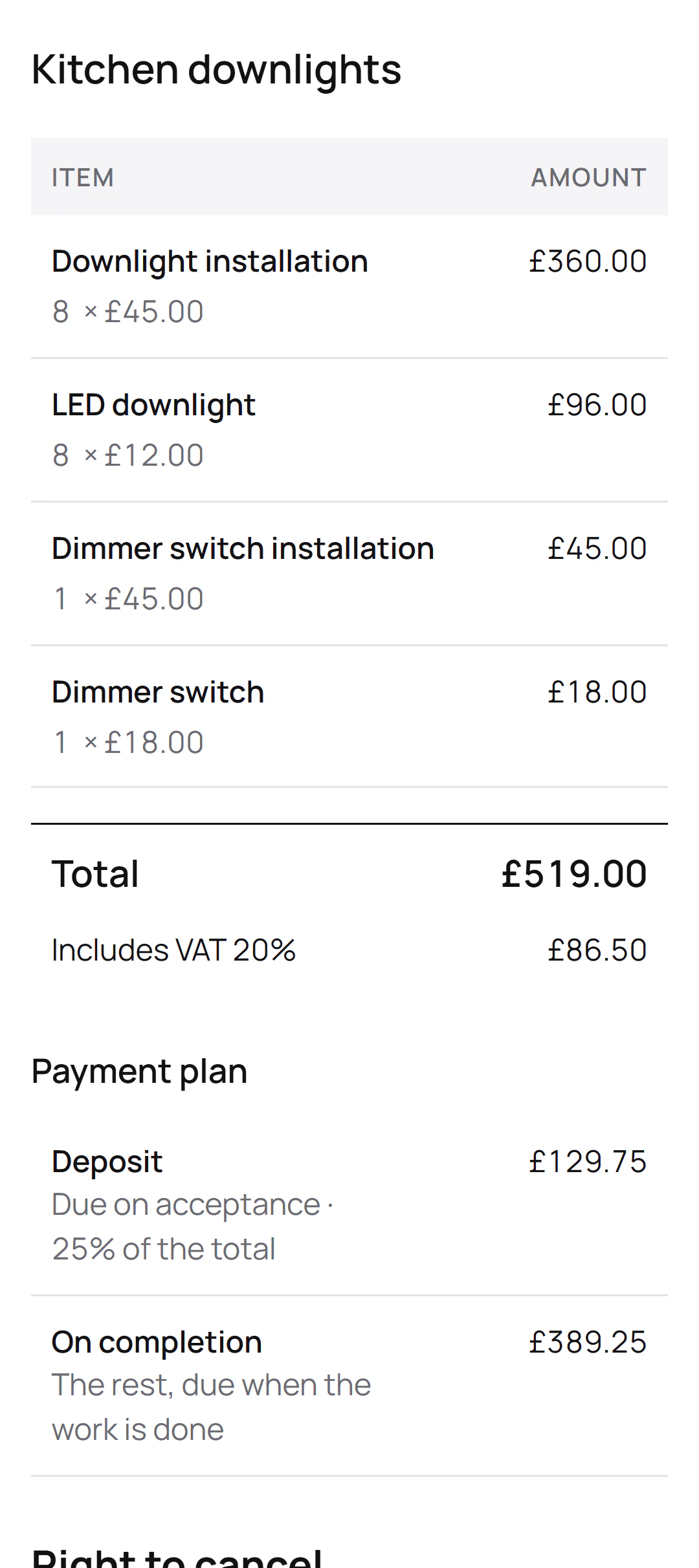
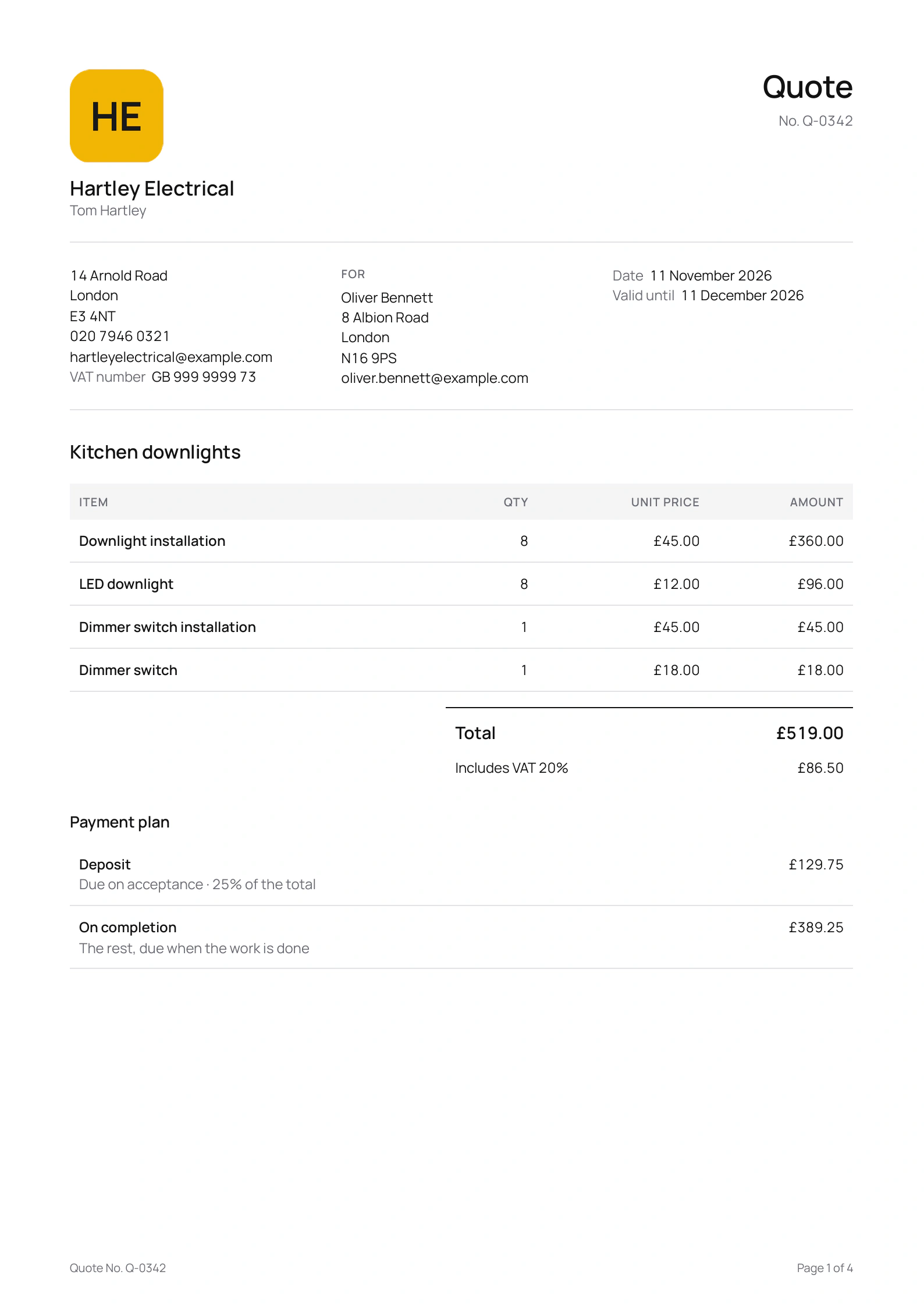
Tom Hartley is the London electrician in this site’s screenshots, a demo business we set up for them. He quoted Oliver Bennett for eight downlights and a dimmer, with a 25% deposit:
The quote
- Downlight installation
- LED downlight
- Dimmer switch installation
- Dimmer switch
The payment plan
- Total: £519.00, including £86.50 VAT
- Deposit, due on acceptance: £129.75, 25% of the total
- On completion: £389.25
The 25% went out as Tom set it, on the quote’s page and on the PDF. On a full rewire he’d put a “First fix done” stage between the two, and invoice it from the quote once the first fix is in.
How does the customer pay the deposit?
By card from the quote’s page, if you take card payments with Stripe. As soon as the customer accepts, Quotebird issues the deposit invoice and they can pay it there and then, straight into your own Stripe account.
Without Stripe, open the accepted quote, tap Invoice the deposit under Invoices and send it. Your payment details print on every invoice, so a bank transfer works just as well.
How do I invoice a stage when it’s done?
From the quote. Under Invoices, tap the stage’s row, Materials delivered or Mark as done, and the invoice opens with that payment’s amount and a line saying which share of the quote it bills. Check Payment due, on receipt or in 7 to 60 days, then send it as a link, a PDF or an email.
When the job’s finished, Final invoice starts from the quote’s items and takes off every stage invoice you’ve sent, so it asks only for the balance.
Is there a cap on the deposit?
Not in Quotebird for UK jobs: the plan asks for exactly what you set, and nothing is lowered. If a customer cancels from the link within the 14 days, you refund them from the app in one tap, and Quotebird reminds you of the refund deadline.
Questions
Can I record a deposit paid in cash or by transfer?
Yes. Open the deposit invoice and tap Record payment, then choose cash, cheque or transfer. The invoice shows what’s left to pay, and you can share a receipt.
Do stage invoices get payment reminders?
Yes, when you email them from the app: 3 days before they’re due if you gave at least 7 days to pay, then 1, 7, 14 and 30 days after.
What if the job changes after the customer accepts?
Send a change order. Once it’s signed, it adds to or takes off the payment due on completion, and the deposit and stages stay as agreed.
Step by step, with every button
Questions? Write to us at support@quotebird.app.