
Deposits and stage payments for Kiwi tradies
Ask for a deposit when the customer accepts, bill a bigger job in stages, and see straight away when a deposit runs past the 10% Consumer Protection advises. Quotebird points it out; the deposit stays your call.
Coming soon to the App Store and Google Play.
Is there a limit on deposits in New Zealand?
Not a hard cap in Quotebird, but a guide: Consumer Protection advises customers to pay no more than 10% as a deposit. When yours goes over that, a note under the plan says so with the dollar figure, and the deposit goes out as you set it.
The note is for consumers. Business customers, business premises, cleaning and car repairs don’t get it.
How do I add a deposit and stages to a quote?
Pick a Default deposit in Settings, from 10% to 50% or none, and new quotes start with it in their Payment plan. Change it on any quote as a percentage or a dollar amount.
For a bigger job, tap Add a payment: When materials are delivered for the cylinder or the bathroom suite, or a Stage payment with your own name, like “Rough-in done”. On completion picks up whatever is left, GST included like the rest.
A toilet replacement, paid on completion
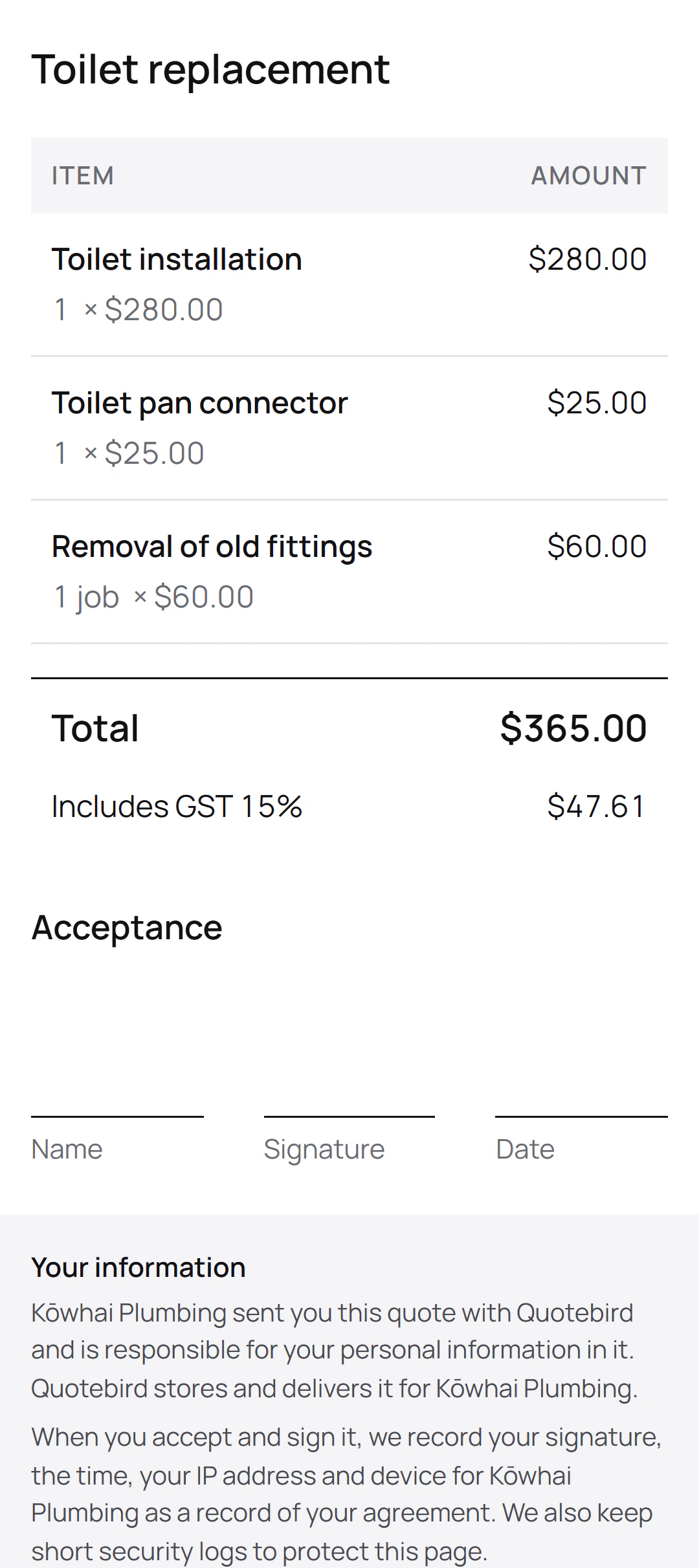
Ben Walker is the Wellington plumber in this site’s screenshots, a demo business we set up for them. He quoted Rachel Kim in Berhampore for a toilet replacement, with no deposit:
The quote
- Toilet installation
- Toilet pan connector
- Removal of old fittings
What it asked for
- Total: $365.00, including $47.61 GST
- No deposit: the whole price on completion
With a deposit
- Up to 10%, $36.50 here, and no note appears.
- Above $36.50, the note under the plan points to Consumer Protection’s advice; the deposit still goes as set.
With no payments in the plan, the quote and its page show the total and where to accept and sign. On a cylinder swap, where the cylinder alone is $1,450 in Ben’s price book, a payment when materials are delivered would cover it without a big deposit.
When does the customer pay the deposit?
When they accept, if you take cards with Stripe: Quotebird issues the deposit invoice straight away and they can pay it on the quote’s page. Without Stripe, invoice the deposit yourself from the accepted quote.
If you started the sale at the customer’s door or by phone and it’s over $100, Quotebird holds the payment for the 5 working days the Fair Trading Act gives them to cancel, then emails them the link.
How do I invoice each stage?
Open the accepted quote when a stage comes due and tap its row under Invoices: Materials delivered or Mark as done. The invoice opens with that payment’s amount, ready to send as a link, a PDF or an email, with your payment details printed on it for a transfer. The Final invoice takes off every stage invoice already sent.
Can I get paid for parts before the job is finished?
Yes, with a payment When materials are delivered. Add it to the plan with the cost of the parts, and invoice it once they’re on site. A big part then stays off the deposit, so the deposit can stay small.
Questions
Does the deposit include GST?
Yes. A percentage is worked out on the quote’s total, GST included, and so is the 10% the note compares it with.
Can I record a deposit paid by bank transfer?
Yes. On the deposit invoice, tap Record payment and choose transfer; the invoice shows what’s left, and you can share a receipt.
What if the job grows after the customer accepts?
Send a change order. Once it’s signed, it adds to, or takes off, the payment due on completion, and the deposit and stages stay as agreed.
Step by step, with every button
Questions? Write to us at support@quotebird.app.