
Deposits and stage payments for tradesmen in Ireland
Ask for a deposit on acceptance, break a bathroom refit or a heating job into stages, and let the final invoice deduct everything already billed. Every amount is in euro and comes off the quote’s total, VAT included.
Coming soon to the App Store and Google Play.
How does a deposit work on a quote?
You choose a percentage once, in Settings → Default deposit, and every new quote asks for it when the customer accepts: ten, twenty, twenty-five, thirty or fifty per cent, or nothing. On any one quote, open the Payment plan to change it or put in a fixed euro amount.
The plan prints under the totals: the deposit, its amount and the share of the total it is, then the balance due when the work is done.
Can I break a big job into stages?
You can. In the Payment plan, tap Add a payment and choose When it falls due: When materials are delivered, for the day the boiler or the bathroom suite arrives, or a Stage payment under a name of your own, like “Pipework in”. Set a percentage or an amount for each, and the last row, On completion, keeps whatever is left over.
A shower valve and basin taps in Salthill
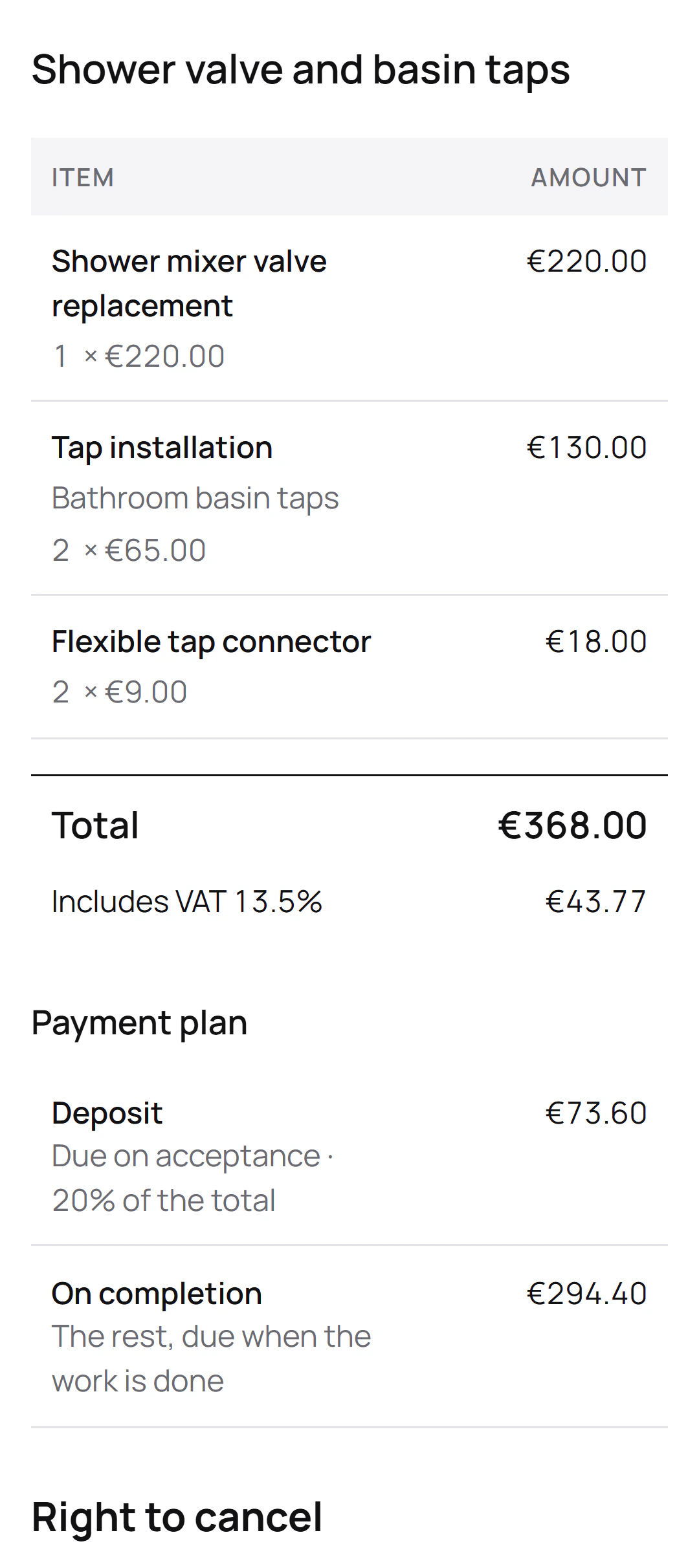
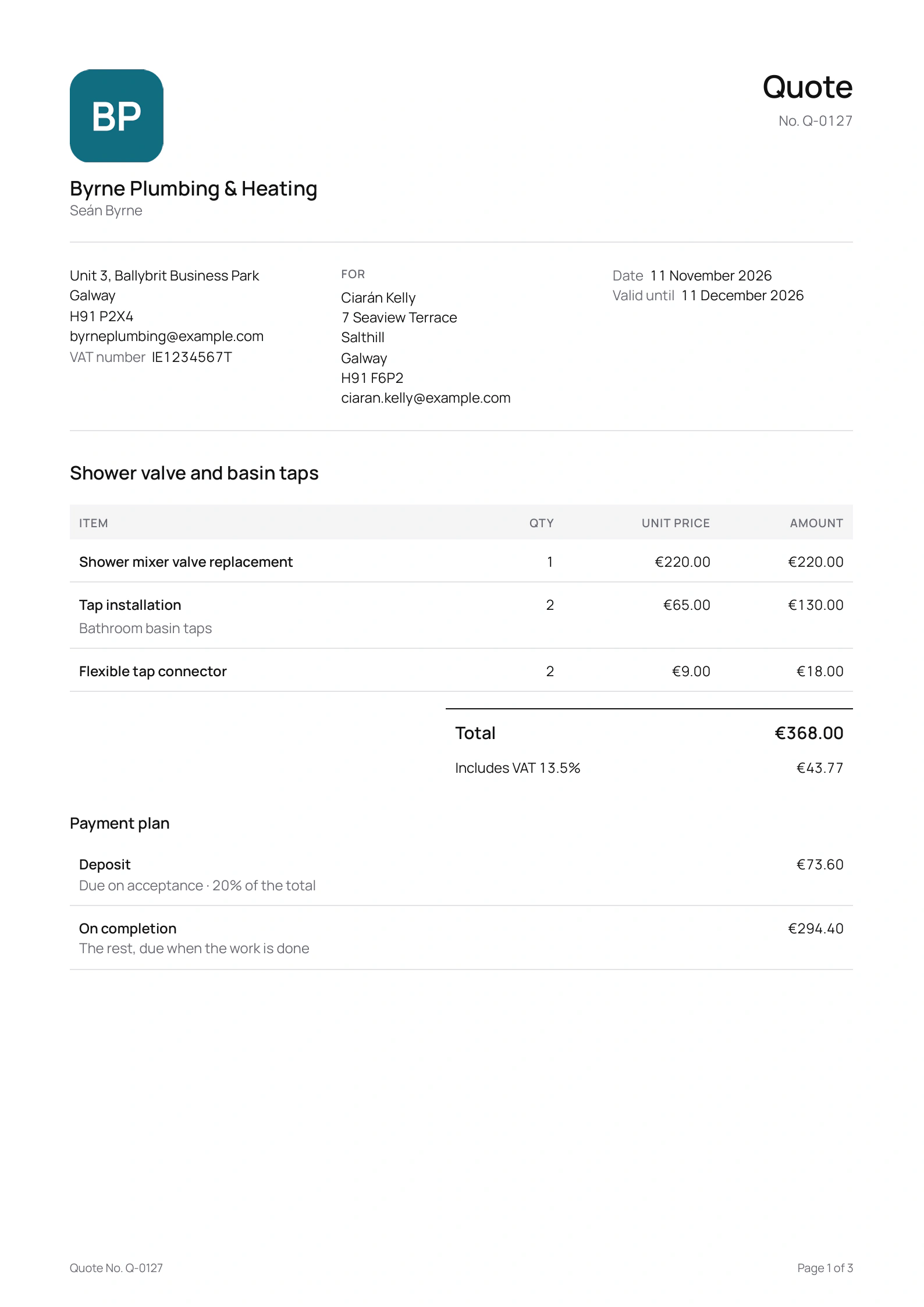
Seán Byrne is the Galway plumber in this site’s screenshots, a demo business we made for them. He quoted Ciarán Kelly in Salthill for a new shower valve and two basin taps, asking 20% on acceptance:
The quote
- Shower mixer valve replacement
- Tap installationBathroom basin taps
- Flexible tap connector
The payment plan
- Total: €368.00, including €43.77 VAT at 13.5%
- Deposit, due on acceptance: €73.60, 20% of the total
- On completion: €294.40
The deposit went out at 20%, as Seán set it. If Ciarán accepts from the link and Seán takes cards with Stripe, the €73.60 deposit invoice shows up on the same page the moment he signs, and the final invoice later asks for the €294.40.
Can the customer pay the deposit online?
Yes, if you take card payments with Stripe. Once they accept the quote on its page, Quotebird issues the deposit invoice on the spot, with a Pay button under it, and the money lands in your own Stripe account. Not using Stripe? Raise the deposit invoice yourself from the accepted quote, and the customer pays by bank transfer to the details printed on it.
How do I bill each stage?
When a stage is reached, open the accepted quote and tap its row under Invoices, Materials delivered or Mark as done. The invoice comes filled in with its amount, split by VAT rate where the job has more than one, ready to go as a link, a PDF or an email.
At the end, the Final invoice lists the work and deducts every stage invoice already sent, leaving the Amount due. If you emailed an invoice from the app and it isn’t paid, Quotebird sends the reminders for you.
Does Quotebird cap deposits in Ireland?
No. For jobs in Ireland, Quotebird lowers nothing and the plan asks for what you set. Where your customer can cancel, the quote and its page say so, and if they cancel after paying by card, you refund them from the app.
Questions
Can I take the deposit in cash?
Of course. Open the deposit invoice, tap Record payment and choose cash, cheque or transfer. The invoice shows Paid once nothing is left, and you can share a receipt from the payment.
What if the customer wants extra work?
Send a change order for it. When the customer signs it, the change is added to, or taken off, the payment due on completion; the deposit and stages don’t move.
Is VAT included in the deposit?
Yes. A percentage deposit is worked out on the quote’s total including VAT, so the customer pays the deposit with its VAT and the final invoice deducts it.
Step by step, with every button
Questions? Write to us at support@quotebird.app.