
Quotes from photos for Kiwi tradies
Take a few photos, say what the job needs, and Quotebird drafts the quote from your own price book, GST included. You check every line before the customer sees it.
Coming soon to the App Store and Google Play.
How does it work on site?
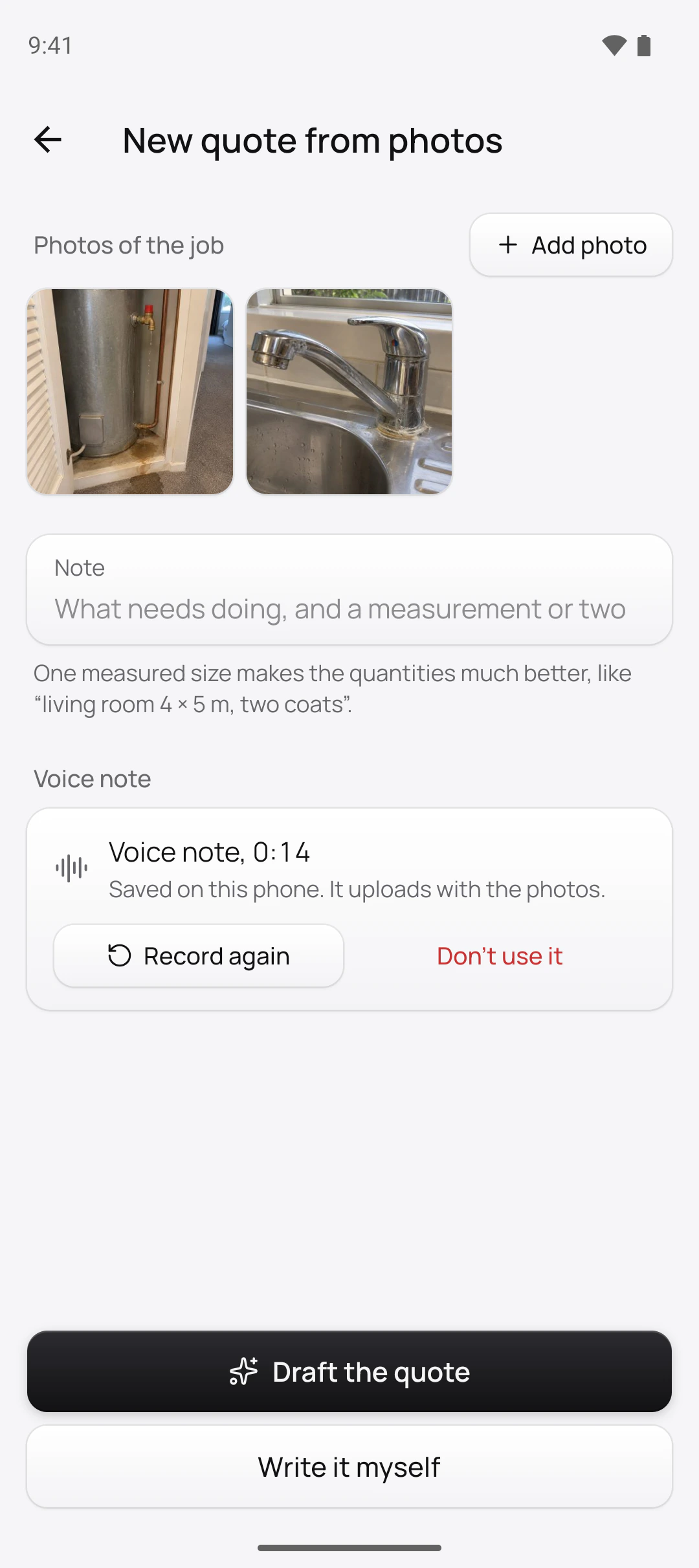
Tap the camera button and take a few photos; the first five go to the AI. Then say what the job needs in a voice note of up to three minutes, or type a note. A size or a length, like “180 litre cylinder” or “about 3 m of pipe”, gets you better quantities than the photos alone.
Tap Draft the quote. The quote opens straight away and the lines come through a few seconds later, each one an item from your price book with a quantity and a unit.
Can I quote from photos the customer texts me?
Yes. When someone texts a photo of a drip under the sink, save it to your phone, add it with Choose from library and type what they told you into the note. The Worth checking list gives you what to ask them before you send the quote.
On Pro, customers can send them straight to you through your request link. Put it on your website or Facebook page; each request lands in Quotes as a draft quote with the photos, the address and what they need. If they agree to an AI draft, the lines are there when you open it.
A cylinder valve and a kitchen mixer, drafted
Ben Walker is the plumber in this site’s screenshots, a demo business we set up for them. He took two photos and recorded six seconds:
“Fix the leaking valve on the hot water cylinder and replace the kitchen mixer.”
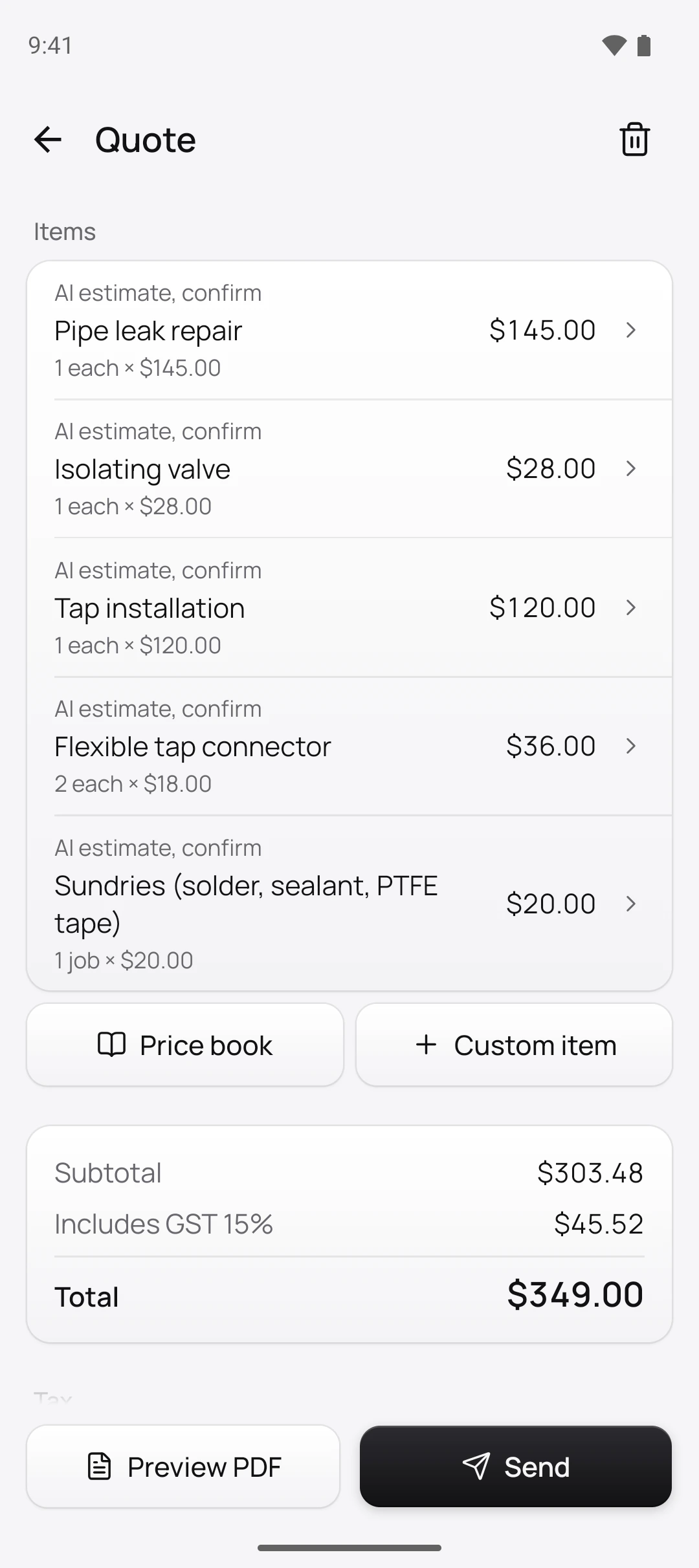
What the draft listed
- Pipe leak repairReplace the leaking valve on the cylinder
- Isolating valve
- Tap installationReplace the kitchen mixer
- Flexible tap connector
- Sundries (solder, sealant, PTFE tape)
What it assumed
- The customer supplies the new kitchen mixer.
- The cylinder is mains pressure and otherwise sound.
Worth checking
- Has the floor under the cylinder been checked for water damage?
The customer is buying the mixer, so the draft priced fitting it and the two connectors, not the tap itself, at Ben’s prices with GST included. That assumption can go onto the quote as a note.
Who sets the prices, and how does GST work?
You do. The AI chooses items from your price book and estimates the quantities, never the dollars. Each line is the quantity times your own price, GST included, and Quotebird adds up the GST and the total. Work your book doesn’t have arrives as No price.
When the quote becomes an invoice, it follows IRD’s rules: your GST number over $200, and the buyer’s name and a contact detail over $1,000.
What about a quote I start at the door?
For a sale over $100 that you started at the customer’s door or by phone, the Fair Trading Act gives them time to cancel. Quotebird prints the front page the Act asks for and holds payment for the 5 working days. Jobs where the customer called you aren’t affected.
Do I need to check what the AI did?
Yes, and the app makes it quick. Every quantity the AI estimated is marked AI estimate, confirm until you open it, check it and tap Save, and Quotebird tells you before sending if any are left.
What happens to the photos, and with no coverage?
Quotebird asks first. When you ask for a draft, the photos and notes go to OpenAI’s AI, which doesn’t train on them and deletes them within 30 days. Switch AI drafts off in Settings whenever you like; see our privacy policy.
Out of coverage? Take the photos and tap Draft the quote anyway. The quote waits as Waiting to start and drafts once everything has uploaded.
Questions
Will my customer know AI was involved?
Yes. The quote prints “This quote was drafted with the help of AI. The business set the prices.”
How accurate are the quantities?
A good first pass. Give it a measurement and it uses yours over its own estimate, and anything in the voice note it can’t make sense of comes back as a question.
Is there a limit on drafts?
Up to 20 an hour, with the Standard or Pro plan. Write it myself builds the quote without the AI.
Step by step, with every button
Questions? Write to us at support@quotebird.app.