
A price book for Kiwi tradies
Set your prices once, GST included, and every quote and invoice takes them. Start from a book that says spouting, flush box and WoF, and let the AI pick items while the dollars stay yours.
Coming soon to the App Store and Google Play.
What is a price book in Quotebird?
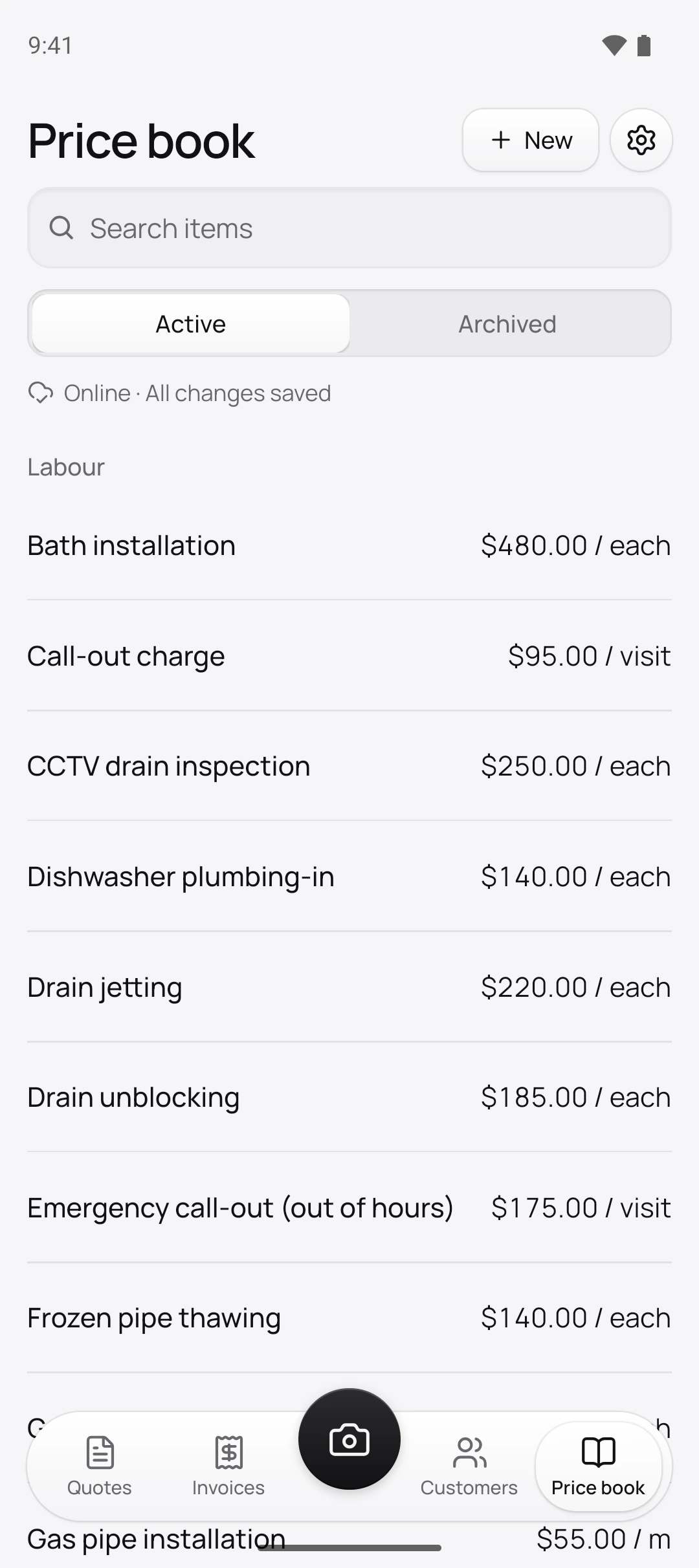
The list of everything you charge for: labour, materials and other charges like removal of old fittings. Quotes and invoices take their prices from it, so you work a price out once, not on every job.
Tap New on the Price book tab. Each item has a Name, a Type (Labour, Material or Other), a Unit like each, hour, metre or m², and a price, which can stay empty for now: the item reads No price until you fill it in.
Is the starter book written for New Zealand?
Yes. Tap Choose your trade and Quotebird adds 30 to 80 items in metric units and local words. The plumber’s book has Hot water cylinder element replacement, PEX pipe (16 mm) and Gas certification (CoC and gas safety certificate), and no radiator work. The sparky’s has Switchboard upgrade, Power point installation and Testing and certification (CoC and ESC); the roofer’s has spouting, and longrun roofing iron by the metre.
Mechanics get a Warrant of Fitness (WoF) inspection, painters a House wash before painting, and pressure washing goes by its Kiwi name, Waterblasting. Your hourly rate goes on the hourly labour items.
A hot water cylinder, invoiced at Ben’s prices
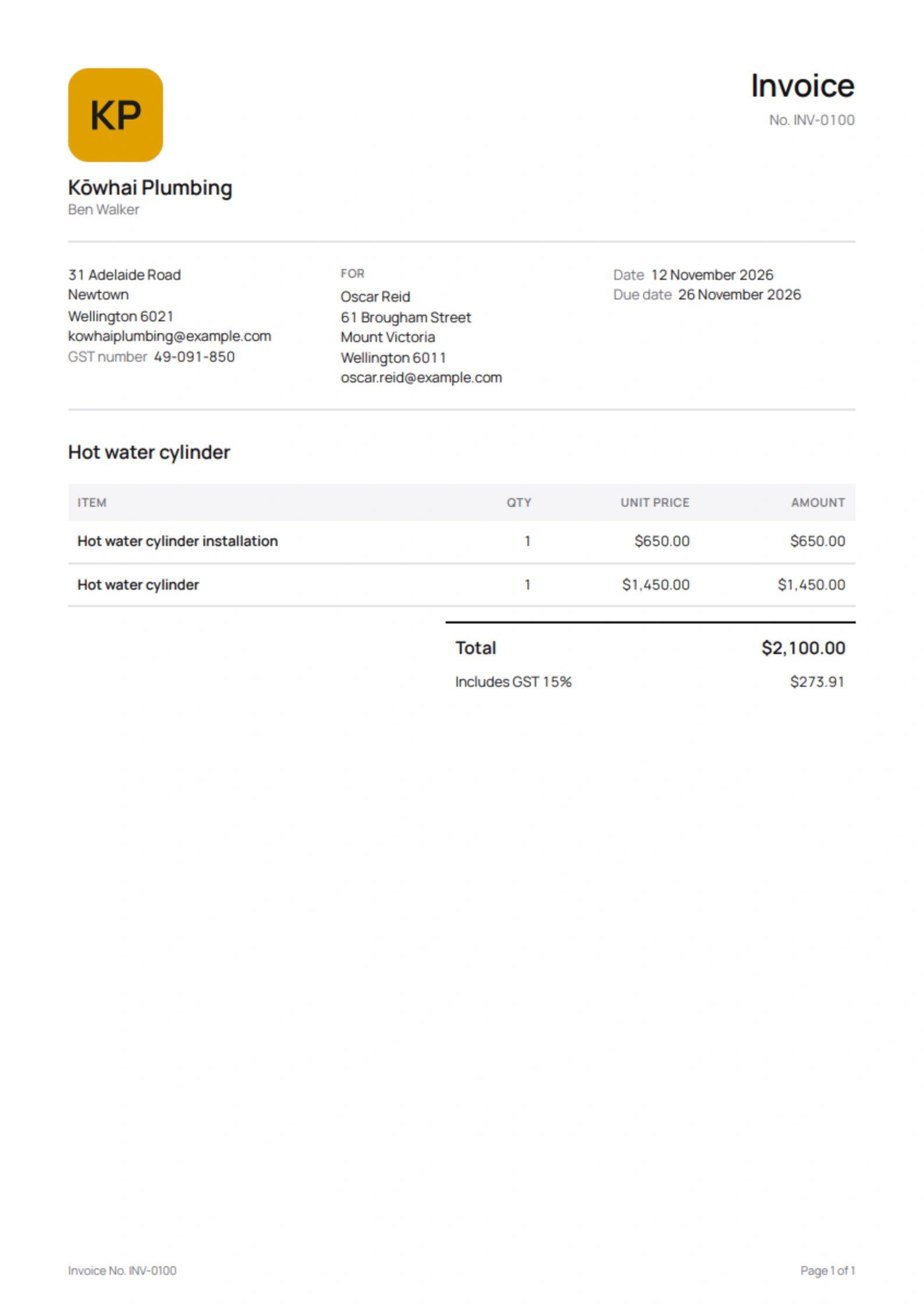
Ben Walker is the Wellington plumber in this site’s screenshots, a demo business we set up for them. He keeps the cylinder and the fitting as two items in his book, so his invoice to Oscar Reid in Mount Victoria has two lines:
From his price book
- Hot water cylinder installation$650.00, labour
- Hot water cylinder$1,450.00, material
On the invoice
- $2,100.00 in all, GST included
- $273.91 of that is GST at 15%
- Ben’s GST number, and Oscar’s name and address, as the total is over $1,000
Ben’s $95 hourly rate went on his Labour item when he added the starter book; the cylinder he priced himself. When his supplier puts the price up, he changes it once in the book, and this invoice stays as it was sent.
How does GST work with my prices?
New quotes start with Prices include GST on, so your book price is what the customer pays, and each line takes 15% GST as it’s added. Quotebird works the GST out of the total. Not registered? No GST is charged and your book stays the same.
Quotebird’s invoices then show your GST number from $200, and the buyer’s name and a contact detail over $1,000, the amounts IRD sets.
Does the AI use my prices?
It never sees them. The AI drafting your quote from photos is given your item names, units and types only; it picks items and quantities, and Quotebird multiplies by your price. A part your book doesn’t have comes in as No price, adding nothing to the total.
Price it, tap Save, and pick Save to price book so the next quote has it, or Only this quote.
What changes when I update a price?
Only what comes next. New quotes and invoices use the new price, as do drafts you add the item to; those already sent keep theirs. When you stop doing a job, Archive its item: it leaves the list, new quotes and the AI, waits under Archived and returns with Restore. Items are never deleted, since sent paperwork may name them.
Can I import my price list?
Yes, from a CSV file with a header row, out of another app or a spreadsheet. In Settings → Import customers and items, choose Price book, then Choose CSV file. Quotebird matches the columns by name for you to check. Up to 5,000 rows go in at once, and an item whose price can’t be read arrives without one.
Questions
Can I price longrun by the metre?
Yes. The roofer’s book sells longrun roofing iron by the metre of sheet, and any item can use metres, square metres, cubic metres, litres, kilograms or tonnes.
Do I need a price on every item?
No. An unpriced item shows No price and adds nothing until you set one, so price the book as the work comes in.
Can I get my price book out of Quotebird?
Yes. Settings → Export your data prepares a zip with every PDF you sent and price-book.csv, archived items included.
Step by step, with every button
Questions? Write to us at support@quotebird.app.