
Tap to Pay and card payments for Kiwi tradies
Your phone takes the card on site, and the invoice link takes it from anywhere else. Either way the money goes straight into your own Stripe account, and you see Quotebird’s share on every payment.
Coming soon to the App Store and Google Play.
How do I get paid on site?
With Tap to Pay on iPhone and Android, which needs no card reader. Open the invoice and tap Tap to Pay (Tap to Pay on iPhone on an iPhone). At Waiting for the card…, the customer holds their contactless card, phone or watch against the back of your phone, and enters a PIN on your screen if asked. The screen shows the amount and Quotebird’s share before the card is read.
For a quick job you haven’t invoiced, New on the Invoices tab has Tap to Pay too: enter What it’s for and the Amount, and Quotebird issues the numbered invoice, then takes the card.
And customers who pay later?
They pay from the invoice’s link. The page shows what’s left to pay and a Pay button, and Stripe’s secure page takes the card in New Zealand dollars. A quote with a deposit becomes a deposit invoice on the same page once it’s accepted.
An invoice you emailed from the app gets reminders: 3 days before it’s due if you gave at least 7 days, then 1, 7, 14 and 30 days after. Each one shows what’s left to pay, and they stop once it’s paid.
A cylinder by link, a toilet repair by tap
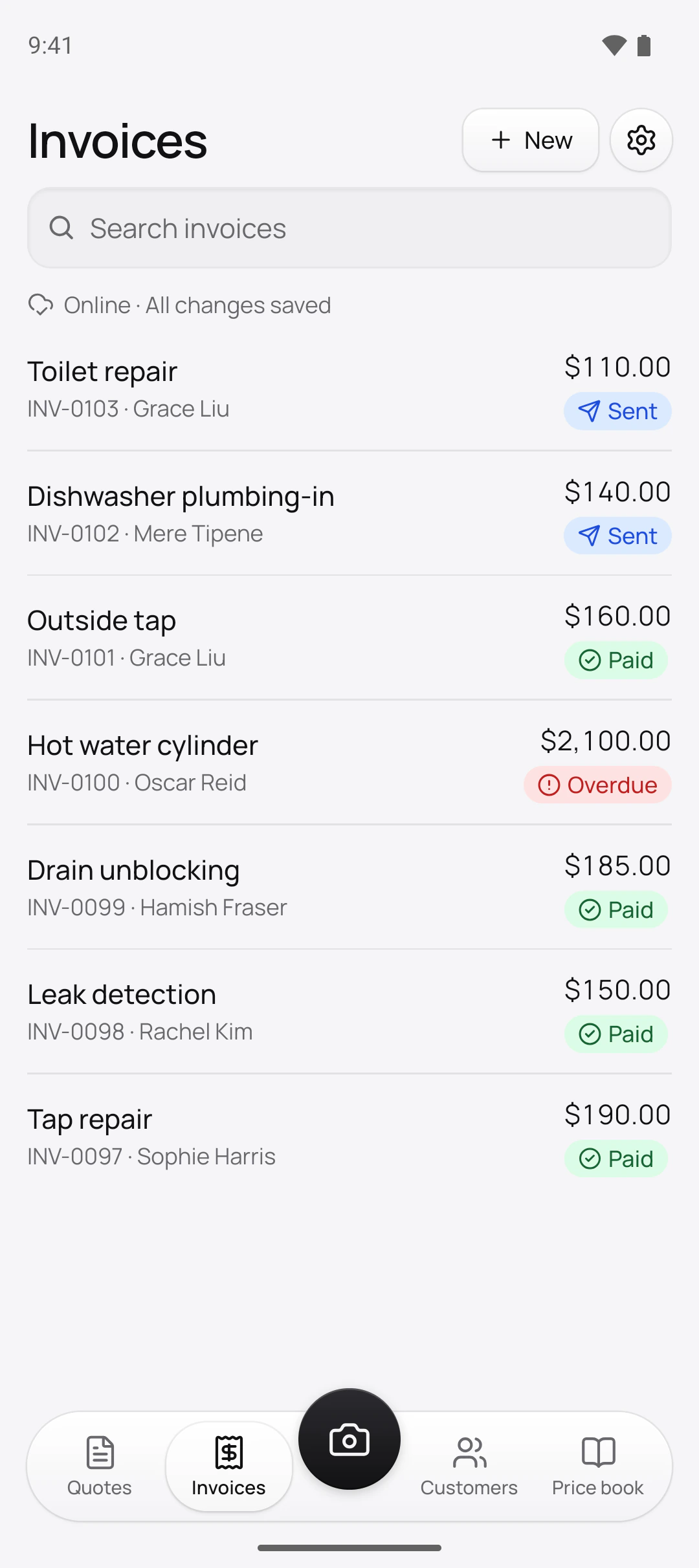
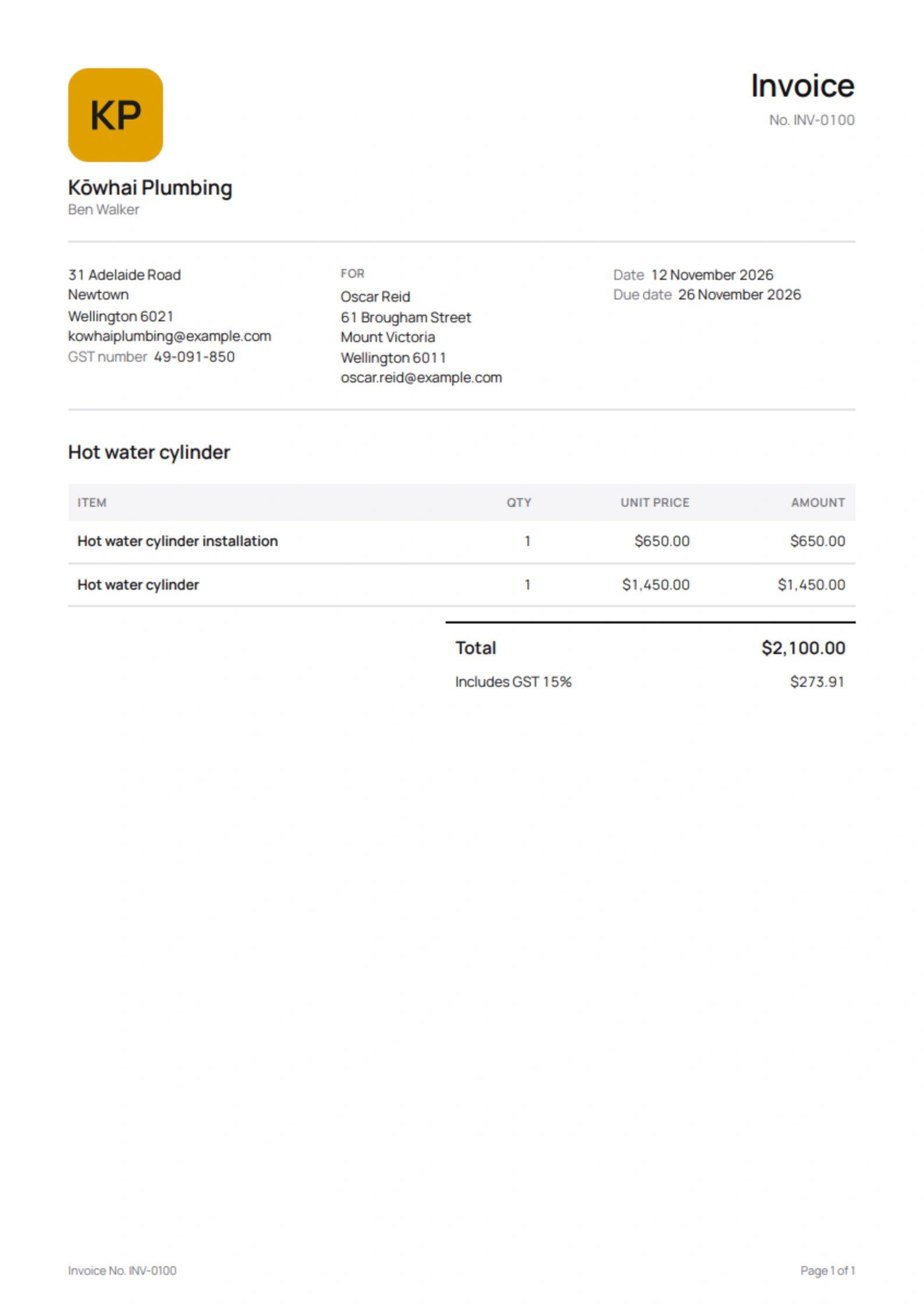
Ben Walker is the Wellington plumber in this site’s screenshots, a demo business we set up. Two of his unpaid invoices show both ways a card comes in:
The payments
- Hot water cylinderOscar Reid’s $2,100.00 invoice, INV-0100, paid by card from the link
- Toilet repairGrace Liu’s $110.00 invoice, INV-0103, tapped on Ben’s phone
Quotebird’s share
- Standard (1%): $21.00 on the cylinder, $1.10 on the repair
- Pro (0.5%): $10.50 and $0.55
- Stripe’s card fee comes off each one too.
Both amounts include 15% GST, and the share is taken from what the customer pays. Once Oscar pays, his invoice shows Paid, and any email reminders about it stop.
Whose account is the money in?
Yours. Every payment is made on your own Stripe account, a full one with Stripe’s own dashboard, and Quotebird never holds it. Set it up from Settings → Get paid online → Set up payments: Quotebird opens the account in New Zealand with your business name and trade from your profile, and Stripe’s form asks for the rest. Until payments are on, each draft shows Turn on online payments above Send as a reminder.
What does Quotebird take from each payment?
1% on Standard and 0.5% on Pro, rounded down to the cent and worked out on what the customer pays, GST included. Stripe’s own card fee comes off as well, and you’ll find it in your Stripe dashboard. Cash and bank transfers you record carry no share. See pricing.
Where the Fair Trading Act holds payment for 5 working days, the customer’s page says when they can pay, and the link opens by itself once the days are over.
How do I give money back?
Open the payment on the invoice and tap Refund; give back the lot or part of it, and it goes to the customer’s card from your Stripe balance. Refunds need a connection. Quotebird returns its share in proportion when you refund in the app, while a refund done in the Stripe dashboard, or a chargeback the bank decides for the customer, keeps it. Stripe doesn’t give back its own fee.
When does it land in my bank?
Stripe pays your balance into your bank on a schedule: Daily, Weekly, Monthly or Manual. Quotebird sets new accounts to daily once, and you change it in your Stripe dashboard. On Manual, card payments wait in your Stripe balance, and each one in Quotebird says This money waits in Stripe. Your Stripe dashboard shows when each payout arrives.
Questions
Is it Stripe’s Tap to Pay?
Yes. Tap to Pay in Quotebird runs on Stripe, into the Stripe account Quotebird opens for you, so card payments from the link and from your phone land in the same place.
What if Stripe asks for more information?
Get paid online shows Stripe needs more information. Tap Give Stripe the information by the date shown, or Stripe pauses card payments until it has what it asked for.
What if the card can’t be read?
Some cards only work inserted in a card machine, which Tap to Pay can’t do. Send the invoice’s payment link instead, and the customer pays on their own phone.
Do my customers see your share?
No. It shows only on your screens: the plans screen, Get paid online, the Tap to Pay screen and each card payment.
Step by step, with every button
Questions? Write to us at support@quotebird.app.