
Estimates homeowners approve and pay online
Send the estimate as a link or an email after the service call. The homeowner signs on their phone and pays the deposit by card, and Ontario’s or B.C.’s notices for a home visit go on by themselves.
Coming soon to the App Store and Google Play.
How do homeowners approve an estimate online?
They sign it on the page your link opens. Under your logo they see the estimate as printed: each line, the HST or the GST and PST, the payment plan and any statement the province asks for. Nothing to download, no login; Download PDF keeps a copy.
At the bottom they tick any notice that wants their initials, agree to receive the documents electronically, give a name and an email, then draw a signature or let the typed name sign. One tap on Accept and sign emails the signed copy to the homeowner and to you.
Should I text the estimate, send a PDF or email it?
Whichever the homeowner reads. Send needs a connection, because our server numbers the estimate, and Quotebird then keeps an exact copy that can’t be changed. After that, Share link texts the page, Share PDF passes on the file, and Email to … has Quotebird deliver it.
That email carries your business’s name with “via Quotebird” after it, and the PDF attached. A reply reaches the email in your business profile, not the one you log in with. You can email up to 100 documents a day.
An AC tune-up in Toronto, sent for a signature
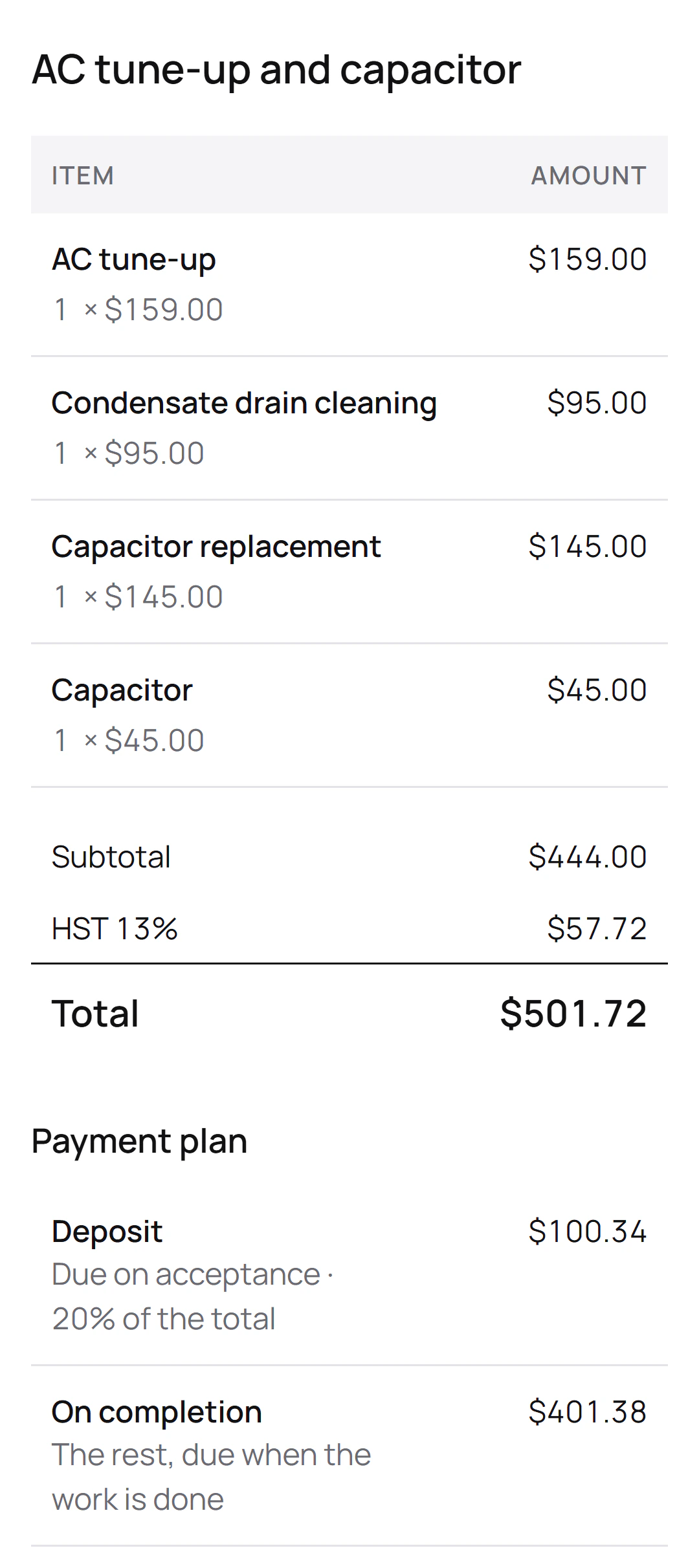
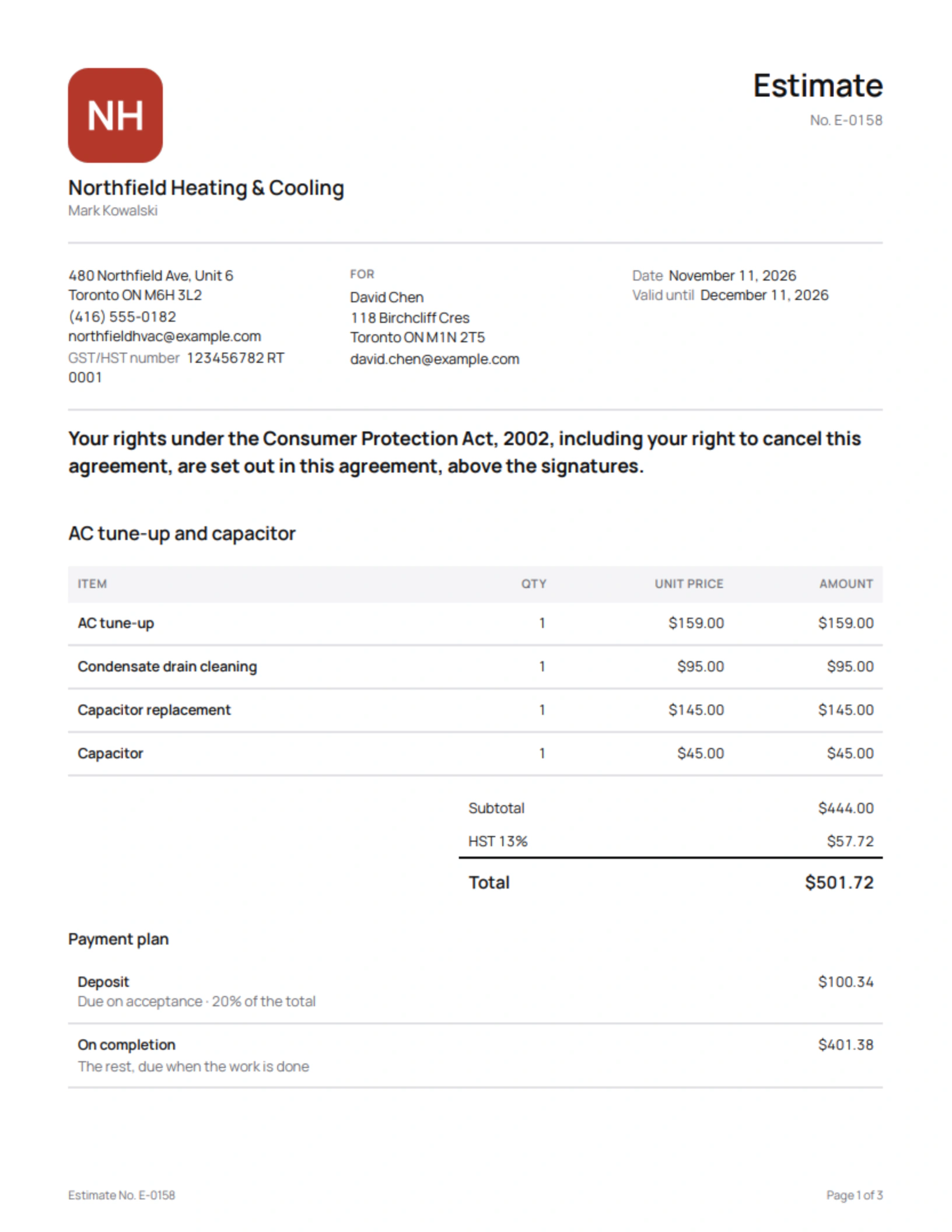
Mark Kowalski is the Ontario HVAC contractor in this site’s screenshots, a demo business we built for them. After a visit to David Chen’s house, he sent estimate E-0158 with a 20% deposit:
What the estimate lists
- AC tune-up
- Condensate drain cleaning
- Capacitor replacement
- Capacitor
What David sees
- A statement that his rights under Ontario’s Consumer Protection Act, 2002, including the right to cancel, are set out above the signatures.
- 13% HST on a $444.00 subtotal: $57.72.
- A total of $501.72, with $100.34 due on acceptance.
- $401.38 left for when the work is done.
When David signs, the two of them get the signed copy by email and Mark’s phone marks the estimate Accepted. If Mark takes card payments with Stripe, the $100.34 deposit invoice then opens on David’s page, ready to pay.
What do Ontario and B.C. customers see for work at their home?
The province’s own words. After a visit to the home, the estimate carries Ontario’s statement of rights or British Columbia’s Schedule A, word for word, with the ten days to cancel. Quoting a furnace, an air conditioner or a water heater, Quotebird first asks what the customer called you for, since Ontario, B.C. and Québec limit those sales at the home.
A homeowner can also sign on your phone: choose Customer signs on this phone, and their page stays open on it for 30 minutes. For a repair you’ll do on the spot, Start work on the Invoices tab has the homeowner sign an estimate before you begin.
Can they pay the deposit right away?
From the link, by card. Once you take card payments through Stripe and the estimate has a deposit, accepting it issues the deposit invoice, which appears on the same page with a Pay button. The money lands in your own Stripe account and Quotebird emails the homeowner a receipt.
Will I know when they’ve looked at it?
The Customer page row on the sent estimate says Not opened yet, then Viewed and the date once the homeowner has the page open; link previews and your own visits are left out. Your Quotes tab shows the same, then Accepted, and an email reaches you the moment they sign.
Need to change something first? Revise keeps the number and the link, and the page won’t take a signature until you tap Send revision.
Who chases invoices that aren’t paid?
Quotebird does, for invoices you sent with Email to …. Your customer gets a reminder 3 days before the due date if you gave at least 7 days, then 1, 7, 14 and 30 days after, each sent once between 9 am and 6 pm your time, with the invoice and the balance owing. Reminders end when the invoice is paid, voided or credited, and you can switch them off for one invoice or for everything in Settings.
Questions
Can customers in Québec get the estimate in French?
Yes. For a job in Québec, the estimate, the page and the emails go out in French, and the customer can ask for English. Voir la page en français.
Can the homeowner pay by Interac from the link?
The link takes cards. For Interac debit, use Tap to Pay on your phone while you’re there; an e-Transfer you receive can be recorded on the invoice as a bank transfer.
Can I stop reminders for one customer?
For one invoice, yes. Its Payment reminders row shows the next reminder’s date; tap it to stop them, and tap again to bring them back.
Step by step, with every button
Questions? Write to us at support@quotebird.app.